Settings > Preview Scaling

The Preview Scaling setting may be used to reduce the resolution of video processing when you are using a fair amount of filters, transitions, and track blending. This may help with the performance during the editing process.
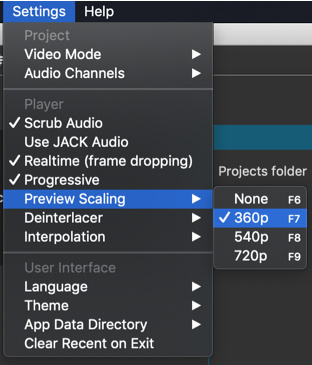
However, keep in mind that the source video or images must typically be scaled down to the designed preview scale, and that will have a processing cost. See Settings > Proxy Editing for the remedy to that. Proxy generates substitute clips at the same resolution as preview scale to eliminate the overhead of this scaling.

The submenu lists only the vertical resolution. The horizontal resolution depends on the aspect ratio of your project.

  • 360p is a good choice on a 1080p screen or less
  • 540p is good choice when working on a high density screen or screen with resolution > 1080
  • 720p is a good choice when working on a 4K screen or with 4K UHD footage and you want to get a
    little more clarity

Preview Scaling was added in version 20.02.

Export

Export > Advanced > Video has the option Use preview scaling.
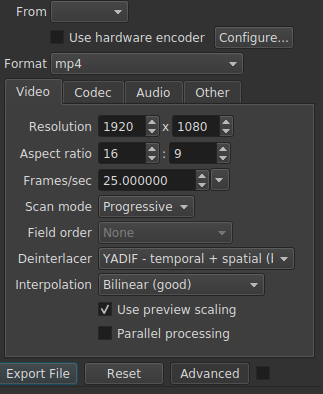
This is intended to provide a faster export for draft review. You should leave the export resolution set to the project resolution unless your preset or video codec dictates a resolution.

Caveats

  • The Stabilize video filter disables preview scaling for the clip on which it is applied because it is incompatible.
  • Preview scaling is a step further away from WYSIWYG (what you see is what you get) and does not provide perfect fidelity and full precision. Some differences are unavoidable especially where blur, softness, and noise are concerned.
1 Like
Use Preview Scaling? What is it?
Video is laggy and audio is very choppy
Why Is my shotcut playback so laggy
What can I do to speed up Timeline editing operations: zoom and movement?
Xeon 8 core 16 threads lagging on a simple project
Will hardware upgrades improve my editing time?
Constant Crashes
Singapore's "Cruise to Nowhere"
How to Reduce Memory Usage
How To Rid Of Glitches & Stutters When Play Head Is Moving From One Clip To Another Clip It Is Really Annoying
Editing 60FPS video creates lag in shotcut
Bad cursor synchronization in timeline
When I read a video in shotcut, it skip frames at some places, this bug is still there when compressing the read video
Freezing when two videos are in the output
Impending doom: Shotcut is slowly destroying my work and it doesn't let me fix it back!
"Two lines perspective" filter set: New file available for the "2160p, 30 fps" Video Mode
A problem - lag
I need help to be able to export my videos!
Decrease in video quality while editing
Jagging back and forth in exported(mp4) video, but also runs really slow in preview
Lag at transitions
Is Shotcut broken now?
Low end pc
My laptop crashes while exporting video?
Extremely slow when selecting adding or selecting anything in the timeline
How to fix sound weird
Resolution problem proxy
Shotcut not working on new asus tuf DASH f15
Audio gets distorted after trimming the beginning of a video
How to speed up the export time?
Video slow then jumping
Smooth work
Sound is fine when played in windows, but sounds distorted in shotcut editing
Preview slows down with size filter active
21.03.21 audio stutter in .MOV
Why is my audio distorted?
Filter On / Off Toggle
When I generate a slideshow Shotcut just keeps freezing
Why is my shotcut lagging?
Using MLTs as clips - pre-rendering
Shotcut running slowly
Need too much memory (RAM)
Shotcut slows down and blocs everything
When changing video preview quality the effects break
Problems
Audio issue
Very poor playback performance for 4K video, while VLC is fast
Video and sound is skipping before I export
Smooth panning and framerate issues
I'm slow 😀
Shotcut crashing when dragging a video to the timeline
Videos stuttering while using negative audio offset
Playback extremely slow
Shotcut too much memory and crashing
Imported videos receive a quality drop
Chroma Key Advanced filter and stuttering video on play
Can you edit a video in 720 and export in 4k?
Jerky images when viewing the timeline / Images saccadées lors du visionnage des pistes
How do I make the project 1080p?
Age old export and preview speed
Getting Started - MP4 compressed during import
Newbie Q: my title blocks run veeerrrryyyy slow
Can Shotcut Incoporate K-Lite Codec Pack for H.264/265/Av1 Playback and Editing
El editor no fluye
Opacity keyframe not working
Mi surface 6 pro i7 no puede con el programa
My system lag when playing videos
Shotcut not responding when cutting playhead
Lagging fix
Preview very choppy even if set at 360p
A/V desynchronization using hardware encoder
Framerate was constant despite export settings. Here's why.
Performance became jumpy after upgrade
Low video resolution
User Guide - Table of Contents
Audio problems with mp3 files
Filter editing performance issues when there are many clips
Fisheye Video Filter
Simple Shape Mask tanking performance, lagging, and crashing?
Shotcut "time" runs slower than actual time
Shotcut work slow
Видео тормозит при редактировании