Settings > Preview Scaling

The Preview Scaling setting may be used to reduce the resolution of video processing when you are using a fair amount of filters, transitions, and track blending. This may help with the performance during the editing process.
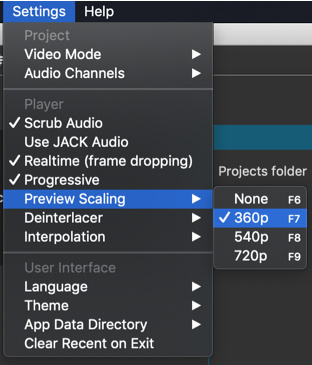
However, keep in mind that the source video or images must typically be scaled down to the designed preview scale, and that will have a processing cost. See Settings > Proxy Editing for the remedy to that. Proxy generates substitute clips at the same resolution as preview scale to eliminate the overhead of this scaling.

The submenu lists only the vertical resolution. The horizontal resolution depends on the aspect ratio of your project.

  • 360p is a good choice on a 1080p screen or less
  • 540p is good choice when working on a high density screen or screen with resolution > 1080
  • 720p is a good choice when working on a 4K screen or with 4K UHD footage and you want to get a
    little more clarity

Preview Scaling was added in version 20.02.

Export

Export > Advanced > Video has the option Use preview scaling.
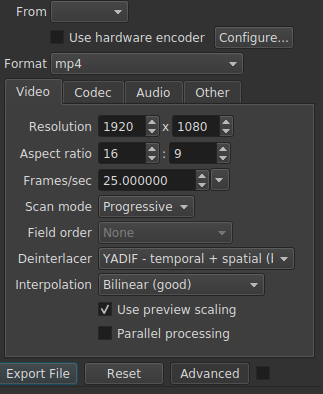
This is intended to provide a faster export for draft review. You should leave the export resolution set to the project resolution unless your preset or video codec dictates a resolution.

Caveats

  • The Stabilize video filter disables preview scaling for the clip on which it is applied because it is incompatible.
  • Preview scaling is a step further away from WYSIWYG (what you see is what you get) and does not provide perfect fidelity and full precision. Some differences are unavoidable especially where blur, softness, and noise are concerned.
1 Like
Use Preview Scaling? What is it?
Video is laggy and audio is very choppy
Why Is my shotcut playback so laggy
What can I do to speed up Timeline editing operations: zoom and movement?
Xeon 8 core 16 threads lagging on a simple project
Constant Crashes
How To Rid Of Glitches & Stutters When Play Head Is Moving From One Clip To Another Clip It Is Really Annoying
Will hardware upgrades improve my editing time?
How to Reduce Memory Usage
Singapore's "Cruise to Nowhere"
Fisheye Video Filter
Using MLTs as clips - pre-rendering
How to speed up the export time?
Shotcut work slow
Smooth work
Why is my shotcut lagging?
When I generate a slideshow Shotcut just keeps freezing
Video slow then jumping
Framerate was constant despite export settings. Here's why.
A/V desynchronization using hardware encoder
Preview very choppy even if set at 360p
Lagging fix
Shotcut not responding when cutting playhead
My system lag when playing videos
Mi surface 6 pro i7 no puede con el programa
Audio gets distorted after trimming the beginning of a video
Opacity keyframe not working
El editor no fluye
Can Shotcut Incoporate K-Lite Codec Pack for H.264/265/Av1 Playback and Editing
Newbie Q: my title blocks run veeerrrryyyy slow
Getting Started - MP4 compressed during import
Age old export and preview speed
How do I make the project 1080p?
Jerky images when viewing the timeline / Images saccadées lors du visionnage des pistes
Can you edit a video in 720 and export in 4k?
Chroma Key Advanced filter and stuttering video on play
Imported videos receive a quality drop
Shotcut too much memory and crashing
Playback extremely slow
Videos stuttering while using negative audio offset
Shotcut crashing when dragging a video to the timeline
I'm slow 😀
How to fix sound weird
Smooth panning and framerate issues
Video and sound is skipping before I export
Very poor playback performance for 4K video, while VLC is fast
Audio issue
Видео тормозит при редактировании
When changing video preview quality the effects break
Shotcut slows down and blocs everything
Need too much memory (RAM)
Resolution problem proxy
My laptop crashes while exporting video?
Lag at transitions
Low end pc
Is Shotcut broken now?
Jagging back and forth in exported(mp4) video, but also runs really slow in preview
Impending doom: Shotcut is slowly destroying my work and it doesn't let me fix it back!
A problem - lag
Shotcut "time" runs slower than actual time
Decrease in video quality while editing
I need help to be able to export my videos!
Freezing when two videos are in the output
"Two lines perspective" filter set: New file available for the "2160p, 30 fps" Video Mode
Filter editing performance issues when there are many clips
When I read a video in shotcut, it skip frames at some places, this bug is still there when compressing the read video
Bad cursor synchronization in timeline
Editing 60FPS video creates lag in shotcut
Is My Laptop good enough to handle Shotcut?
User Guide - Table of Contents
Low video resolution
Performance became jumpy after upgrade
Problems
Filter On / Off Toggle
Shotcut running slowly
Shotcut not working on new asus tuf DASH f15
Why is my audio distorted?
Extremely slow when selecting adding or selecting anything in the timeline
21.03.21 audio stutter in .MOV
Simple Shape Mask tanking performance, lagging, and crashing?
Preview slows down with size filter active
Audio problems with mp3 files
Sound is fine when played in windows, but sounds distorted in shotcut editing