This generates a countdown or count-up leader traditionally used in film and television before program start.
This generator recreates classic film leader / broadcast countdown visuals, including numbers, timing marks, and optional reference sounds.
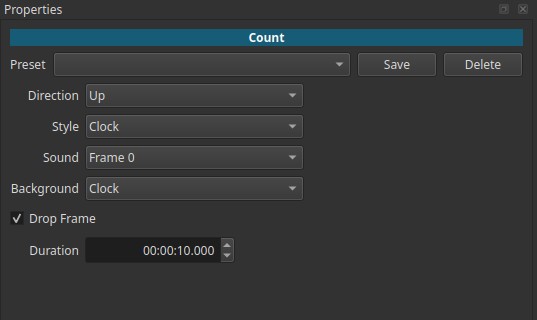
Count is a generator, not a filter.
All controls are adjusted in the Properties tab of the generated clip.
What a count leader is (historical context)
Before digital playback, films and tapes required manual cueing and synchronization.
Countdown leaders were used to:
- Signal that a program was about to start
- Give projectionists and broadcasters time to cue playback
- Synchronize sound and picture
- Provide a reference point (“start at zero”)
These leaders were commonly seen:
- At the beginning of cinema reels
- Before television programs
- On broadcast tapes and test transmissions
The rotating clock, quadrant background, and large numbers are all part of this legacy.
Generator behavior
- Produces an animated video
- Duration is explicitly defined by the user
- Animation and numbers depend on style and direction
- Must be evaluated during playback to understand timing
Parameters
Direction
Defines whether the count decrements or increments.
-
Down
Classic countdown toward zero. -
Up
Count-up / chronometer behavior.
Style
Controls how time is represented visually.
Seconds
Displays only whole seconds.
- Does not display the starting value
- Displays 0 at the end
- Example (Duration = 10 s, Down):
9 → 8 → … → 1 → 0
Seconds +1
Displays the starting second value.
- Displays the starting number
- Does not display 0 at the end
- The animated needle continues through the final second
Example (Duration = 10 s, Down):
10 → 9 → … → 1 (no visible 0)
Frames
Displays frame numbers based on the project’s frame rate.
- Uses the project FPS
- The counter spans the entire duration of the generated clip, starting from the total number of frames (countdown) or from zero (count-up).
- Useful for frame-accurate timing
Timecode
Displays time in HH:MM:SS:FF format.
- FF = frames
- Matches standard video timecode representation
Clock
Displays time in HH:MM:SS format.
- No frame display
- Acts as a visual timer
Sound
Controls reference audio cues.
2-Pop
Plays a short beep exactly one second before the end.
- Classic synchronization cue
- Widely used in film and broadcast workflows
Silent
No sound.
Frame 0
Plays a short beep every second.
- Useful as a rhythmic timing reference
Background (Clock | None)
Controls the visual style of the background.
-
Clock
Animated film-leader style background with rotating sweep and quadrant divisions. -
None
Plain background with numbers only.
Drop Frame (checkbox)
Controls whether drop-frame timecode is used.
- Relevant only when using Style > Timecode
- Applies to NTSC-derived frame rates
- Does not affect visual countdown styles
Duration (time input)
Sets the total length of the generated count.
- Format:
HH:MM:SS.mmm - Determines how many seconds, frames, or units are shown
Visual characteristics
- Large, high-contrast numbers
- Rotating clock-style sweep (when enabled)
- Quadrant background reminiscent of film leaders
- Designed for readability and timing clarity

Contemporary use
Today, count leaders are used primarily as historical or stylistic elements, rather than technical necessities.
Common modern uses include:
- Intro or outro sequences
- Documentary or archival context
- Retro or broadcast-era aesthetics
- Clear visual timing before content starts
- Creative transitions referencing cinema or television history
Use with other filters
Count generators are often combined with filters for creative or practical purposes:
-
Blur
Soften the image for stylized transitions. -
Color grading
Convert to aged tones or colorize. -
Blend modes
Overlay the count on footage as a transitional element.
Usage notes and tips
- Choose Seconds +1 if you want the starting value to be visible.
- Use 2-Pop only when an audio reference is meaningful.
- Match Duration carefully to your intended cue point.
- Preview playback to verify timing behavior.
Limitations
- Not intended for modern synchronization workflows
- Visual behavior depends on selected style
- No per-frame visual customization
- Purely representational, not functional timing control