A Gaussian blur smooths the image by averaging pixels using a bell-shaped (Gaussian) distribution, producing a softer and more natural blur than a box blur.
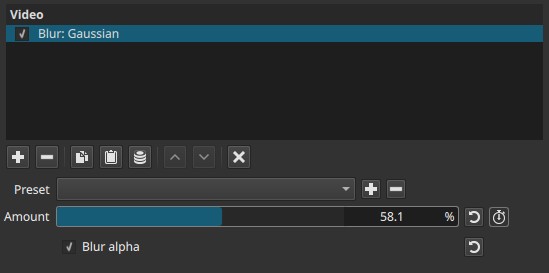
This filter operates spatially and affects the whole image uniformly.
Parameter
Amount (0.0–100.0)
Controls the strength of the Gaussian blur.
-
Lower values
Subtle softening with minimal detail loss -
Higher values
Strong blur with significant reduction of fine detail
This parameter defines how widely pixel values are averaged around each pixel.
Keyframes
The Amount parameter can be keyframed, allowing blur strength to change over time.
This enables:
- Blur-in / blur-out transitions
- Progressive defocus effects
- Emphasis or de-emphasis over time
Blur alpha
When enabled, the blur is also applied to the alpha channel.
-
Disabled
Only RGB color data is blurred; transparency edges remain sharp -
Enabled
Alpha values are blurred as well, softening transparency edges
This is useful when blurring images, titles, or overlays that contain semi-transparent regions.
Visual characteristics
Typical effects include:
- Smooth, natural softening
- Reduction of noise and fine detail
- No directional bias
- Softened transparency edges when Blur alpha is enabled
Gaussian blur produces fewer hard artifacts than simple box blur, but is generally more computationally expensive.
Creative uses
-
Defocus or depth-of-field simulation
Uniform blur to suggest loss of focus. -
Soft transitions
Keyframed blur changes smoothly over time for gentle scene changes. -
Glow or bloom effects
When combined with blending modes on a duplicated track. -
Background softening
Reducing detail to emphasize foreground elements.
Limitations
- Full-frame effect only (no region or mask)
- No directional control
- Blur alpha cannot be keyframed
- High values may remove significant detail