Reduces the number of distinct tonal values in the image, replacing smooth gradients with discrete color or brightness steps.
The result is visible banding and simplified shading, where continuous transitions are intentionally removed.
Posterization originates from both artistic and technical constraints. Historically, it appeared in printmaking and early photographic reproduction, where limited ink densities or exposure steps forced images into discrete tone bands. In digital imaging, posterization became a deliberate effect used to simplify imagery, emphasize shapes, or create graphic, illustration-like results.
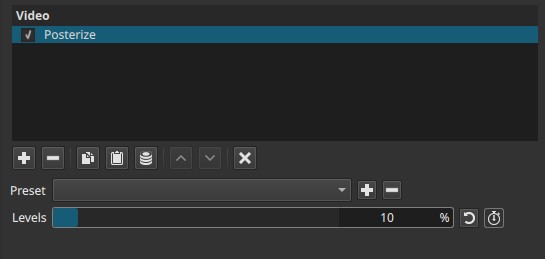
Posterize reduces tonal resolution but does not perform edge detection or alter spatial detail.
Parameters
Levels (0 - 100%)
Controls the number of tonal steps used to represent the image, expressed as a percentage.
-
0%
Extremely low number of tones. Large flat areas of color or brightness dominate the image. Fine shading is almost entirely removed. -
Low values (5% - 30%)
Strong posterization. Gradients break into a few clearly defined bands. Details are simplified into graphic regions. -
Medium values (30% - 70%)
Moderate posterization. Banding is visible but some tonal variation remains. -
100%
Maximum available levels for this filter.
Banding is still present and the image does not return to a fully continuous tone representation.
Important behavior
- 100% does not mean “no effect.”
- The filter always quantizes tones; higher values only increase the number of steps, not eliminate posterization entirely.
Note:
Levels controls how many steps exist, not how strong the effect feels.
Even at maximum, tones remain discretized.
Keyframes
The Levels parameter can be keyframed.
This allows:
- Gradual transitions from realistic footage to a stylized or graphic look
- Temporal emphasis during edits or transitions
- Animated abstraction effects
Visual characteristics
- Visible tonal banding in gradients
- Flat color or brightness regions
- Emphasis on edges and large shapes
- Reduced fine shading detail
The effect is purely spatial and applies uniformly across the frame.
Recommended use cases
- Creating graphic or illustrative looks
- Stylizing footage toward a cartoon-like or poster-print appearance
- Preparing footage for further processing (e.g. edge detection, thresholding)
- Emphasizing form and contrast over realism
Example combinations
-
Posterize + Threshold
Produces a stark, graphic look by first reducing tonal steps and then collapsing them into black and white. Useful for silhouette-style or high-contrast illustration effects. -
Posterize + Sharpen (subtle)
Emphasizes boundaries between tonal bands without attempting true edge detection. This can make shapes read more clearly in posterized footage. -
Posterize + Color Grading / Saturation
Reinforces flat color regions, creating pop-art or screen-print-like visuals. -
Posterize + Gaussian Blur (very low radius)
Softens harsh band transitions between posterized tone regions while preserving the reduced tonal palette. -
Posterize + Mosaic (very subtle)
Reinforces abstraction by simplifying both tone and spatial detail.
Limitations
- No control over which tones are preserved or discarded
- Always introduces banding, even at maximum Levels
- Can exaggerate compression artifacts in smooth gradients
- Not suitable when natural shading must be preserved