Converts the image into a pure black-and-white result by comparing pixel values against a defined threshold level.
All pixels are forced to either black or white, removing grayscale detail and color information.
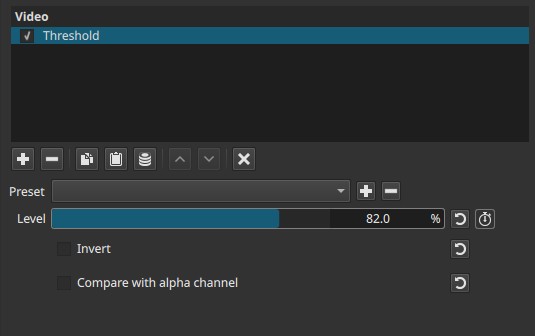
Threshold is a spatial effect applied per frame. It does not analyze motion or time.
Parameters
Level (0.0 - 100.0%)
Defines the cutoff point used to decide whether a pixel becomes black or white.
-
Low values (≈0.0 - 20.0%)
Most pixels are classified as white. Only the darkest areas become black. -
Mid values (≈40.0 - 60.0%)
Balanced split between black and white. Midtones are pushed decisively to one side or the other. -
High values (≈80.0 - 100.0%)
Most pixels are classified as black. Only the brightest areas remain white.
Behavior note:
- The comparison is abrupt: there is no smoothing or feathering.
- Small changes around mid values can cause large visible shifts.
Invert (checkbox)
Swaps the black and white result.
- Pixels that would be white become black
- Pixels that would be black become white
This does not change how the threshold is calculated, only how the result is displayed.
Compare with alpha channel (checkbox)
Changes the source used for threshold comparison.
-
Unchecked
Thresholding is based on the image’s luminance (brightness). -
Checked
Thresholding is based on the alpha channel instead of luminance.
Important behavior notes:
- This option is meaningful only if the clip contains an alpha channel.
- When enabled, visible RGB color information is ignored.
- Useful for visualizing or isolating transparency data.
Keyframes
The Level parameter can be keyframed.
This enables:
- Animated transitions between black and white states
- Progressive reveals or wipes
- Time-based threshold effects driven by luminance or alpha
Visual characteristics
- Output contains only pure black and pure white
- No grayscale or color information
- Sharp, high-contrast edges
- Strong posterized appearance
Recommended use cases
- Creating matte or stencil-like visuals
- Isolating shapes based on brightness
- Graphic or abstract styling
- Preparing hard masks from luminance or alpha
Since none of the Mask filters can use a filtered clip object as a source, export the filtered clip as a frame or intermediate video file to use it with other things. - Diagnostic visualization of alpha channels
Limitations
- No edge softness or anti-aliasing control
- Very sensitive to small Level changes
- Can produce flicker on noisy or compressed footage
- Not suitable for smooth tonal transitions