Applies ordered dithering to the image to approximate smooth tonal transitions using a limited number of discrete values.
Instead of creating smooth gradients, the filter distributes pixels according to a fixed pattern so that tone changes are perceived visually rather than represented directly.
Dithering predates digital video. It was used in early printing, photography, and computer graphics to simulate continuous tones on media that could only represent a small number of intensity levels. Conceptually, dithering is closely related to halftoning: both replace smooth shading with structured patterns that rely on human visual averaging.
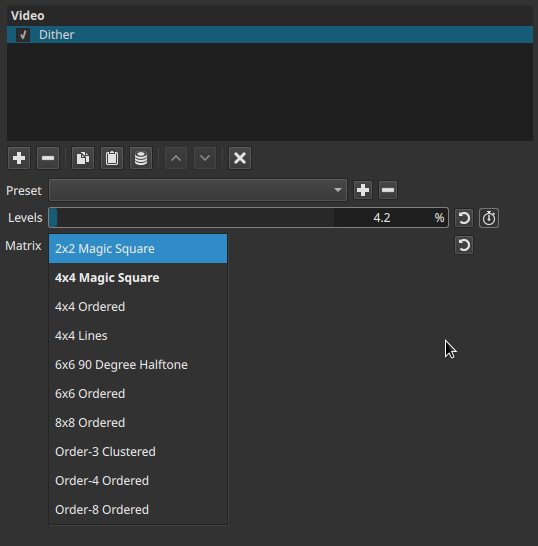
Dither is a perceptual filter, not a blur; it suggests missing tones through spatial patterns rather than creating them.
Parameters
Levels (0.0 - 100.0%)
Controls the degree of tonal quantization before dithering is applied.
-
0%
Very few tonal levels. Strong pattern visibility and high contrast between light and dark regions. -
Low values (10% - 30%)
Heavy dithering with clearly visible structure. Gradients are replaced by pronounced dot or line patterns. -
Medium values (30% - 70%)
Balanced dithering. Patterns remain visible but tones read more smoothly. -
100%
Maximum available levels for this filter.
Dithering remains visible; the effect is never fully disabled.
Important behavior
- Like Posterize, 100% does not restore continuous tones.
- The filter always replaces smooth gradients with patterned approximations.
Matrix (pattern selection)
Selects the spatial pattern used to distribute pixels.
The matrix determines how tonal error is arranged visually.
2×2 Magic Square
- Very small repeating pattern
- Highly visible structure
- Produces coarse, noisy-looking dithering
- Suitable for extreme retro or low-resolution looks
4×4 Magic Square
- Larger version of the 2×2 pattern
- More tonal steps and smoother gradients
- Still clearly patterned
4×4 Lines
- Uses linear, stripe-like arrangements
- Creates directional texture
- Can emphasize horizontal or vertical structure
6×6 90 Degree Halftone
- Dot-based pattern aligned at right angles
- Closely resembles traditional print halftone screens
- Produces a graphic, printed appearance
6×6 Ordered
- Regular ordered grid
- Balanced between smoothness and structure
- Less visually aggressive than smaller matrices
8×8 Ordered
- Large ordered grid
- Smoother perceived gradients
- Pattern is less obvious at normal viewing distances
Order-3 Clustered
- Groups pixels into small clusters
- Softer, less regular appearance
- More organic than ordered grids
Order-4 Ordered
- Medium-density ordered matrix
- Good compromise between pattern visibility and smoothness
Order-8 Ordered
- High-density ordered matrix
- Smoothest tonal transitions among the options
- Least visually distracting pattern
Keyframes
Levels can be keyframed.
This allows:
- Gradual transitions between smooth gradients and strong dithering
- Animated stylistic changes over time
- Controlled visual degradation effects
Parameter interaction
- Levels controls how many tones exist.
- Matrix controls how missing tones are distributed spatially.
Lower Levels with small matrices produce aggressive, high-contrast patterns.
Higher Levels with large matrices produce subtler, smoother dithering.
Visual characteristics
- Structured, repeating patterns
- No true blur or noise
- Detail is preserved as pattern density rather than smooth shading
- Strong dependence on viewing distance
This is a spatial effect; it does not change over time unless keyframed.
Recommended use cases
- Reducing banding in gradients without using blur
- Simulating print, newspaper, or early computer graphics
- Retro or technical visualization aesthetics
- Preparing footage for limited-color or stylized output
Common combinations
-
Posterize + Dither
Produces controlled, intentional banding with structured tone approximation. -
Dither + Old Film: Grain (subtle)
Breaks up overly regular patterns and adds organic texture. -
Dither + Gaussian Blur (very low radius)
Softens pattern harshness while preserving dithering logic.
Limitations
- Patterns are fixed and may alias during scaling or compression
- No adaptive or error-diffusion dithering (e.g. Floyd - Steinberg)
- Can introduce visible structure in flat areas
- Not suitable for naturalistic footage without careful tuning