Simulates halftone printing, a technique historically used in newspapers, magazines, and early color printing to reproduce images using dots instead of continuous tones.
Because printing presses could not vary ink intensity, tonal variation was achieved by changing dot size and spacing. Different ink colors were printed in separate passes, each with its own dot pattern.
This filter is a visual approximation of that process. It converts the image into colored dot patterns whose size and density represent brightness and color intensity.
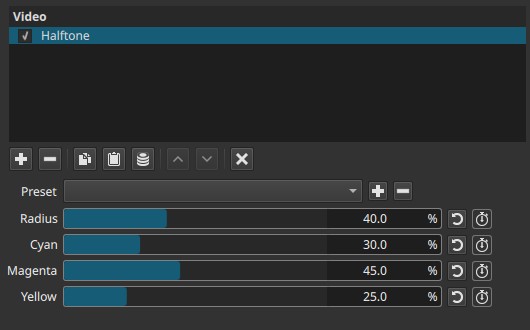
Halftone is a spatial effect. It operates per frame and does not analyze motion.
Warning:
This filter has a known bug. Refer to the corresponding bug report for description, screenshots, and reproduction steps.
Parameters
Radius (0.0 - 100.0%)
Controls the size and spacing of the halftone dots.
-
Low values
Small, dense dots. The image retains more detail and appears closer to continuous tone. -
Mid values
Clearly visible dot structure. Individual dots become distinguishable, and fine detail starts to break into patterns. -
High values
Large dots with wide spacing. Image detail is heavily abstracted and coarse.
Note:
- Radius affects all color channels simultaneously.
- Increasing Radius reduces spatial detail; this is not a blur but a pattern substitution.
- Perceived strength depends on output resolution; dots appear larger at lower resolutions.
Cyan (0.0 - 100.0%)
Controls the contribution of the cyan halftone layer.
-
0.0%
Cyan dots are absent. -
Higher values
Cyan dots become more visible and dominant in the pattern.
Behavior note:
- This control adjusts dot presence, not hue rotation.
- It does not remap colors; it changes how strongly cyan dots participate in the halftone pattern.
Magenta (0.0 - 100.0%)
Controls the contribution of the magenta halftone layer.
-
0.0%
Magenta dots are absent. -
Higher values
Magenta dots become more visible and prominent.
Yellow (0.0 - 100.0%)
Controls the contribution of the yellow halftone layer.
-
0.0%
Yellow dots are absent. -
Higher values
Yellow dots become more visible and influential.
Important note on color controls:
- The sliders do not behave like color correction controls.
- They weight how strongly each CMY dot pattern is applied, not the overall image color balance.
- Black (K) is not a separate channel; dark tones emerge from dot overlap.
Keyframes
All parameters can be keyframed.
This enables:
- Animated transitions between continuous-tone and halftone looks
- Gradual increases in dot size or color separation
- Stylized temporal effects, such as print textures appearing or dissolving over time
Parameter interaction
- Radius defines the geometric structure of the pattern.
- Cyan, Magenta, Yellow define how color information is distributed within that structure.
- High Radius combined with high CMY values produces strong color separation and coarse patterns.
- Lower CMY values can be used to simplify the palette while retaining dot structure.
Visual characteristics
- Image rendered as colored dot patterns
- Reduced fine detail, replaced by geometric texture
- Visible color separation typical of print media
- Strong association with newspaper photos, comic art, and vintage printing
Recommended use cases
- Newspaper or magazine print emulation
- Stylized retro or comic-book visuals
- Abstracting photographic detail into graphic patterns
- Visual transitions referencing print or media reproduction
- Educational demonstrations of halftone printing concepts
Limitations
- Not a physically accurate CMYK simulation
- No control over dot angle, screen rotation, or black (K) channel
- Fine text and thin lines may become unreadable
- Pattern scale is resolution-dependent