This filter emulates the visible texture caused by photographic film stock rather than digital sensor noise. It adds film-style grain to the image by introducing luminance noise.
In photochemical film, grain originates from silver halide crystals embedded in the emulsion. These crystals vary in size and distribution, and when exposed and developed, they create a fine, irregular texture. Faster (high-ISO) film stocks used larger crystals, producing more visible grain. The effect was intrinsic to the medium and varied over time, exposure, and development.
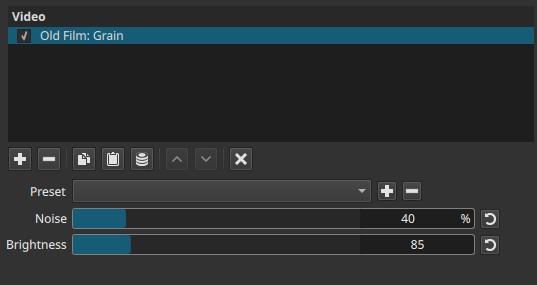
In modern workflows, grain is often reintroduced intentionally to reduce the sterile appearance of digital footage, unify mixed sources, or support historical or archival aesthetics.
Parameters
Noise (1% - 200%)
Controls the intensity of the grain pattern.
-
Low values (1% - 20%)
Subtle grain, often barely perceptible on flat areas. Suitable for breaking up digital smoothness without drawing attention. -
Medium values (30% - 100%)
Clearly visible grain across midtones and highlights. Typical for film-like texture. -
High values (100% - 200%)
Strong, exaggerated grain. The upper range exists to:- Simulate very coarse or pushed film stock
- Remain visible after downscaling, compression, or export
- Allow creative or deliberately degraded looks
Why 200% exists
Grain is frequently reduced by:
- Video compression
- Scaling
- Noise reduction downstream
Allowing values above 100% ensures the effect survives these processes. It is not a “double noise” mode, but a practical headroom for post-processing loss.
Brightness (1 - 400)
Controls how strongly the grain affects luminance levels.
-
Low values (1 - 100)
Grain is subtle and primarily affects midtones and highlights. -
Medium values (100 - 200)
Grain becomes more visible across a wider tonal range. -
High values (200 - 400)
Grain is pushed strongly into brighter regions, increasing contrast between grain and image.
Important behavior
- Pure black pixels remain pure black, even at maximum values.
- Grain is applied additively, not by lifting the black level.
- This matches film behavior: unexposed or fully opaque areas do not reveal grain.
Note:
Brightness does not brighten the image.
It controls how visible the grain is relative to luminance.
Keyframes
This filter does not support keyframes.
The grain pattern and its intensity remain constant over time.
Parameter interaction
- Noise controls how much grain exists.
- Brightness controls where the grain is visible in the tonal range.
High Noise with low Brightness produces dense but restrained grain.
Lower Noise with high Brightness emphasizes grain primarily in brighter areas.
Visual characteristics
- Monochrome, film-style grain
- Even distribution across the frame
- No chromatic noise
- Static behavior per frame (no evolving pattern)
Grain is most noticeable in:
- Flat midtones
- Bright areas
- Soft gradients
Recommended use cases
-
Adding film texture to clean digital footage
-
Matching modern shots to archival or historical material
-
Reducing banding and overly smooth gradients
-
Supporting period aesthetics when combined with other Old Film filters:
- Old Film: Projector (instability, flicker)
- Old Film: Dust (physical debris)
- Old Film: Scratches (emulsion damage)
Used together, these filters approximate different physical artifacts of film capture and projection rather than a single effect.
Limitations
- Grain pattern is not animated; it does not evolve over time
- No control over grain size or color
- Can be partially suppressed by export compression at low Noise values