The Saturation filter adjusts the overall intensity of colors in the image. It uniformly scales color saturation across all hues without favoring or protecting specific color ranges.
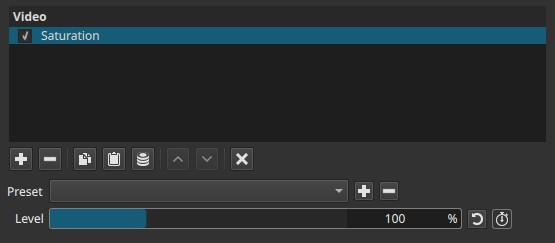
This filter affects color intensity only and does not change brightness or contrast.
For more controlled color enhancement, the Vibrance filter may produce more natural results.
Parameter
Level (0%–300%)
Controls the global saturation level of the image.
-
0%
All color information is removed, producing a grayscale image -
100% (default)
Original saturation (no change) -
Above 100%
Colors become increasingly vivid and intense
This parameter applies the same scaling factor to all colors.
Keyframes
The Level parameter can be keyframed, allowing saturation to change smoothly over time.
This enables:
- Gradual color fade-in or fade-out
- Animated color emphasis
- Stylized transitions between monochrome and color
Visual characteristics
Typical effects include:
- Uniform increase or decrease in color intensity
- Progressive loss of color detail below 100%
- Strong, sometimes exaggerated colors above 100%
- No protection for already saturated colors
Recommended use cases
- Global color intensity adjustments
- Stylized color effects
- Monochrome-to-color transitions
- Situations where equal treatment of all colors is desired
Limitations
- Affects all colors equally
- High values may cause color clipping or unnatural results
- Not selective by hue or saturation range