The Vibrance filter adjusts color intensity in a selective and adaptive way. Unlike saturation, which affects all colors equally, vibrance primarily increases the intensity of less-saturated colors while limiting changes to colors that are already strong.
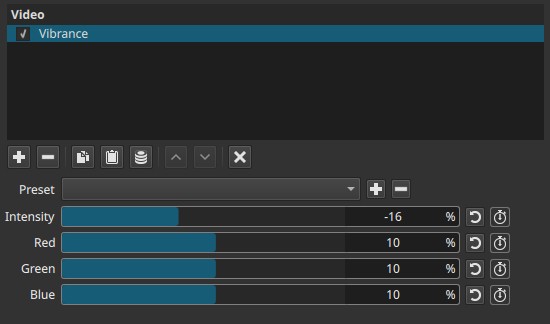
This helps enhance color richness while preserving natural-looking skin tones and avoiding clipping or oversaturation.
Parameters
Intensity (−100 to 100)
Controls the overall strength of the vibrance effect.
-
Negative values
Reduce color intensity, especially in less-saturated areas -
Positive values
Increase color intensity selectively
At higher values, muted colors become more vivid while already saturated colors are affected less aggressively than with saturation.
Red (−100 to 100)
Adjusts vibrance specifically in red hues.
-
Negative values
Reduce vibrance in reds -
Positive values
Increase vibrance in reds
Useful for fine-tuning skin tones, warm highlights, or red-dominant elements.
Green (−100 to 100)
Adjusts vibrance specifically in green hues.
-
Negative values
Reduce vibrance in greens -
Positive values
Increase vibrance in greens
Commonly used for vegetation or correcting green casts.
Blue (−100 to 100)
Adjusts vibrance specifically in blue hues.
-
Negative values
Reduce vibrance in blues -
Positive values
Increase vibrance in blues
Useful for skies, water, or cool-toned scenes.
Keyframes
All parameters of the Vibrance filter (Intensity, Red, Green, and Blue) can be keyframed, allowing vibrance strength and color emphasis to change over time.
This enables gradual color enhancement, animated color emphasis, or dynamic color correction across a clip.
Note:
The per-channel controls modify the vibrance effect and require a non-zero “Intensity” value to have an effect.
“Intensity” controls the overall strength of the vibrance effect.
The Red, Green, and Blue controls adjust how that vibrance is distributed across color channels and have no effect unless Intensity is non-zero.
Vibrance vs Saturation
Although related, vibrance and saturation behave differently:
-
Saturation
Increases or decreases color intensity uniformly across all colors, including already saturated areas. This can quickly lead to clipped colors or unnatural skin tones. -
Vibrance
Adjusts color intensity selectively, focusing on colors that are less saturated and protecting already intense colors and skin tones.
As a result, vibrance produces a more natural and controlled color boost.
Visual characteristics
Typical effects include:
- Increased richness in muted colors
- Better preservation of highlights and skin tones
- Reduced risk of color clipping compared to saturation
- Subtle, adaptive color enhancement
Recommended use cases
- Enhancing flat or washed-out footage
- Improving color presence without oversaturation
- Correcting dull lighting conditions
- Fine-tuning specific color ranges after primary color correction
Vibrance is often best applied before or instead of saturation.
Limitations
- Not a replacement for full color grading
- Extreme values can still produce unnatural colors
- Per-channel adjustments affect only vibrance, not hue