This generates a continuous test tone at a fixed frequency and level.
This generator produces audio only and is commonly used for testing, calibration, and reference purposes.
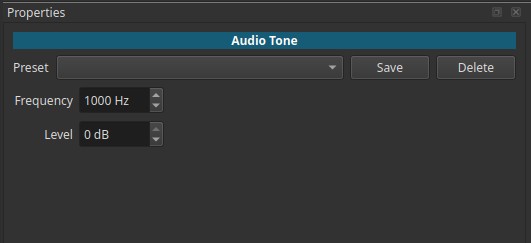
Audio Tone is a generator, not a filter.
All controls are adjusted in the Properties tab of the generated clip.
What an audio tone is
An audio tone is a pure, steady signal at a specific frequency, traditionally used in audio engineering to:
- Test signal paths
- Calibrate equipment
- Identify problems such as distortion or imbalance
- Provide a known reference signal
Unlike music or noise, a tone contains no variation over time unless modified by other filters.
Parameters
Frequency (20 - 9 999 Hz)
Sets the pitch of the generated tone.
-
Low values (20 - 100 Hz)
Very low frequencies; felt more than heard.
Often used to test bass response or subwoofers. -
Mid values (≈440 - 1 000 Hz)
Clearly audible tones; commonly used as reference frequencies.
1000 Hz is a standard test tone in audio engineering. -
High values (>3 000 Hz)
Sharp, piercing tones; useful for testing high-frequency response.
Note:
The tone is a single, fixed frequency with no harmonics.
Level (0 to -90 dB)
Sets the output level of the tone.
-
0 dB
Full level (relative to project headroom). -
Lower values
Progressively quieter tones. -
-90 dB
Nearly inaudible.
This allows precise control over how loud the tone is relative to other audio.
Auditory characteristics
- Constant pitch
- Constant level
- No modulation, rhythm, or dynamics
- Can become fatiguing at higher frequencies or levels
Recommended use cases
- Testing audio signal chains
- Checking speaker balance and routing
- Verifying channel assignments
- Calibrating monitoring levels
- Creating reference tones for tutorials or demonstrations
- Generating beeps or reference signals for synchronization
Usage notes and tips
- Use moderate levels to avoid listener fatigue.
- High-frequency tones can be uncomfortable; use caution.
- Combine with Pan, Balance, or Swap Channels to test routing.
- Add filters (Fade, Gain, Limiter) if you need controlled start/stop behavior.
Limitations
- Produces only a single pure tone
- No built-in modulation or envelopes
- Not suitable for musical content
- Continuous tone unless trimmed or faded