Restricts audio level so it does not exceed a defined maximum, preventing clipping and controlling peaks.
A limiter is a dynamics processor similar to Compressor, but designed to act very strongly once the limit is reached.
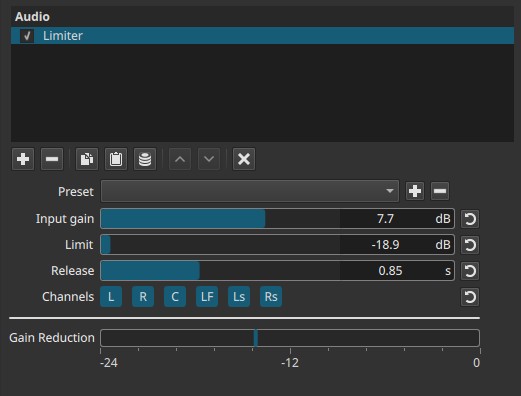
Limiter is a peak-control filter evaluated continuously over time.
Parameters
Input gain (-20.0 to +20.0 dB)
Adjusts the level before limiting is applied.
-
Negative values
Reduce input level, decreasing how often the limiter engages. -
0 dB
No change to the incoming signal. -
Positive values
Increase input level, driving the signal into the limiter more aggressively.
Important concept:
Input gain determines how hard the signal hits the limiter, not the final output level.
Limit (-20.0 to 0 dB)
Sets the maximum allowed output level.
-
0 dB
Allows peaks up to full scale (digital maximum). -
Negative values
Lower the ceiling, leaving headroom and reducing peak loudness.
Once the signal reaches this level, the limiter reduces gain to prevent further increase.
Release (0.01 to 2.00 s)
Controls how quickly gain reduction is released after the signal falls below the limit.
-
Short release (≈0.01 - 0.10 s)
Fast recovery; can sound aggressive or distorted on sustained material. -
Medium release (≈0.10 - 0.50 s)
Balanced behavior for most content. -
Long release (≈0.50 - 2.00 s)
Smooth recovery; preserves natural dynamics but may reduce overall loudness.
Channel selection
Determines which audio channels the limiter is applied to. Buttons are toggle switches.

Available buttons depend on the project’s audio channel configuration: Settings > Audio Channels
- L — Front Left
- R — Front Right
- C — Center
- LF — Low-Frequency Effects (LFE)
- Ls — Surround Left
- Rs — Surround Right
Note:
Independent limiting per channel requires adding separate instances of the filter.
Gain Reduction meter (visual indicator)
A visual-only meter labeled Gain Reduction (-24 dB to 0 dB) displays how much level is being reduced by the limiter.
- The meter moves only when the signal exceeds the Limit.
- It shows reduction amount, not output level.
- It is informational only.
Auditory characteristics
- Prevents clipping and digital distortion
- Reduces dynamic peaks
- Can increase perceived loudness
- Excessive limiting can sound flat or distorted
Recommended use cases
- Preventing clipping on dialogue, music, or effects
- Final level control before export
- Protecting against unexpected peaks
- Increasing loudness safely
- Channel-specific peak control in surround mixes
Example settings
-
Peak protection (transparent)
- Input gain: 0 dB
- Limit: -1 dB
- Release: 0.20-0.40 s
-
Loudness boost (controlled)
- Input gain: +4 to +8 dB
- Limit: -1 dB
- Release: 0.10-0.30 s
-
Dialogue safety limiter
- Input gain: +2 to +4 dB
- Limit: -2 dB
- Release: 0.30 - 0.60 s
Usage notes and tips
- Set Limit first, then adjust Input gain.
- Watch the Gain Reduction meter; constant heavy reduction indicates over-limiting.
- Use longer release times for natural material like dialogue.
- For best results, place the limiter near the end of the audio filter chain.
Limitations
- No look-ahead control
- No soft/hard knee adjustment
- Can introduce distortion if pushed too hard
- Not a substitute for careful gain staging