Adjusts audio loudness by applying a single, fixed gain calculated from a prior analysis pass.
Unlike Normalize: One Pass, this filter does not adapt during playback; it applies a constant gain determined in advance.
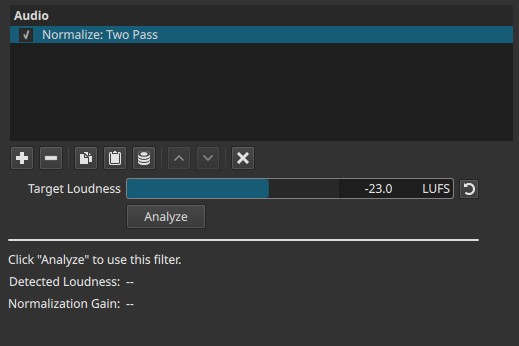
Normalize: Two Pass is an offline loudness normalization filter.
What this filter does
- Analyzes the entire clip to measure its loudness
- Computes a single gain value needed to reach a target loudness
- Applies that gain uniformly across the whole clip during playback and export
- Does not change gain over time
This produces predictable, consistent results.
Parameters
Target Loudness (-50.0 to -10.0 LUFS)
Defines the desired integrated loudness for the clip.
-
Lower values (e.g. -30 to -23 LUFS)
Quieter output, more headroom. -
Higher values (e.g. -16 to -12 LUFS)
Louder output, common for online content.
This value is used only to compute the normalization gain.
Analyze
Runs the analysis pass over the entire clip.
- Measures the clip’s integrated loudness
- Calculates the gain required to reach the target
- Must be run before normalization can occur
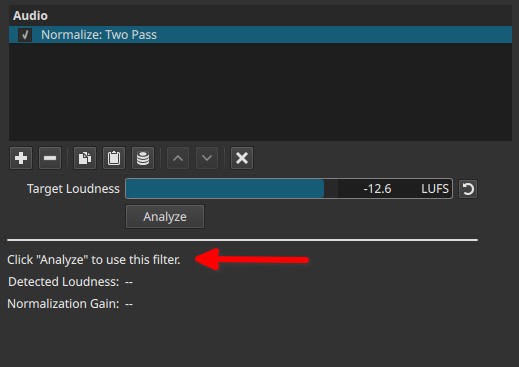
Changing the clip content or Target Loudness requires re-running the analysis.
Analysis results
Displayed after analysis completes.
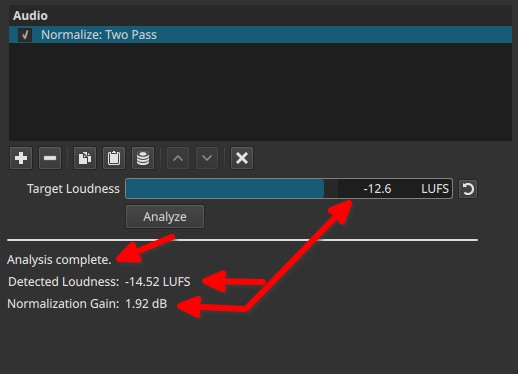
Detected Loudness (LUFS)
Shows the measured integrated loudness of the clip before normalization.
Normalization Gain (dB)
Shows the fixed gain that will be applied to the clip.
- Positive values increase loudness
- Negative values reduce loudness
This gain is applied uniformly to the entire clip.
How normalization is applied
- First pass: analyzes the clip and computes a gain value
- Second pass: applies that gain during playback and export
The filter applies a flat gain adjustment; it is not dynamic.
Auditory characteristics
- Consistent loudness across the entire clip
- No pumping or breathing
- Dynamics within the clip remain unchanged
- Quiet and loud sections keep their relative balance
Recommended use cases
- Normalizing dialogue clips to a consistent loudness
- Matching loudness between different recordings
- Preparing audio for delivery standards
- Batch normalization of multiple clips
What this filter is not
- Not dynamic loudness control
- Not a Compressor or Limiter
- Does not protect against clipping
- Does not adapt to changes within the clip
Usage notes and tips
- Always click Analyze after changing settings or clip content.
- Combine with a Limiter if peak protection is required.
- For clips with large level variation, consider Normalize: One Pass instead.
- Use the displayed gain value to understand how much adjustment is being applied.
Limitations
- Gain is fixed for the entire clip
- Cannot react to internal loudness variations
- Analysis must be repeated after edits