Adjusts audio loudness dynamically during playback to approach a target loudness level, without a prior analysis pass.
Unlike offline or two-pass normalization, this filter reacts in real time and continuously adapts gain as the audio plays.
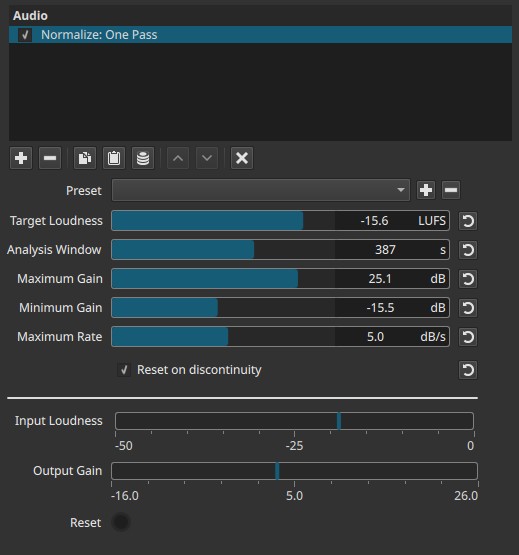
Normalize: One Pass is a loudness-based automatic gain control, not a static normalization tool.
What this filter does
- Measures integrated loudness in real time (LUFS)
- Gradually adjusts gain to approach a target loudness
- Applies changes smoothly over time, not instantaneously
- Does not scan the entire clip in advance
Because it works in one pass, results depend on playback order and analysis window.
Parameters
Target Loudness (-50.0 to -10.0 LUFS)
Defines the desired loudness level the filter attempts to reach.
-
Lower values (e.g. -30 to -23 LUFS)
Quieter overall output, more headroom. -
Higher values (e.g. -16 to -12 LUFS)
Louder output, typical for online content.
Note:
This is a target, not a guaranteed final value.
Analysis Window (2 to 600 s)
Defines the time window over which loudness is measured.
-
Short window (≈2 - 10 s)
Faster reaction to changes, more noticeable gain movement. -
Medium window (≈10 - 60 s)
Balanced behavior for dialogue and mixed content. -
Long window (≈60 - 600 s)
Very smooth, slow adaptation; closer to long-term loudness matching.
Important clarification:
The value is expressed in seconds, not milliseconds.
Maximum Gain (0.0 to +30.0 dB)
Sets the maximum amount of gain increase the filter is allowed to apply.
- Prevents excessive boosting of very quiet material
- Limits noise amplification
Minimum Gain (-30.0 to 0.0 dB)
Sets the maximum amount of attenuation the filter is allowed to apply.
- Prevents excessive reduction of loud sections
- Limits how quiet the output can become
Maximum Rate (0.5 to 9.0 dB/s)
Limits how fast gain is allowed to change over time.
-
Low values
Very smooth, gradual loudness changes. -
High values
Faster adaptation, more audible level movement.
Note:
This controls how quickly the filter reacts, not how much it reacts.
Reset on discontinuity
When enabled, the loudness analysis resets at detected discontinuities such as:
- Cuts
- Seeks
- Playback jumps
This prevents loudness history from one section influencing another.
Visual indicators
Input Loudness (-50 to 0 LUFS)
Displays the measured incoming loudness over time.
- Updates only during playback
- Displayed for monitoring purposes only.
Output Gain (0.0 to 30.0 dB)
Displays the current gain being applied by the filter.
- Shows how aggressively the filter is acting
- Useful for diagnosing over-correction
Reset
A visual, radio-style indicator that lights up when the internal loudness state is reset.
- Informational only
- Indicates analysis restart, not a user action
Auditory characteristics
- Gradual loudness leveling
- No sudden jumps when properly configured
- Can pump or breathe if reaction is too fast
- Quiet sections may still sound noisy if boosted heavily
Recommended use cases
- Long-form dialogue with varying levels
- Live recordings with inconsistent loudness
- Content where a single loudness target is desired
- Preview normalization without offline analysis
What this filter is not
- Not true offline normalization
- Not guaranteed to hit an exact LUFS value
- Not a limiter (peaks can still clip)
- Not ideal for short clips with rapid cuts
Usage notes and tips
- Set Target Loudness first, then constrain behavior with gain limits.
- Use a longer Analysis Window for natural results.
- Keep Maximum Rate low to avoid audible pumping.
- Combine with a Limiter downstream for peak safety.
- Always evaluate during real-time playback.
Limitations
- Results depend on playback order
- No lookahead
- Cannot normalize silence meaningfully