Converts multi-channel audio into a single mixed signal and outputs that signal uniformly to the project’s configured output channels.
All input channels are summed together without regard to channel role or frequency content.
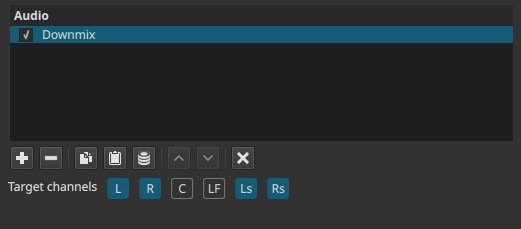
Downmix is a channel-routing and summing filter, not a spatial or frequency-aware processor.
What this filter does
- Sums all input channels into one mono signal
- Sends the same mixed signal to the selected output channel(s)
- Does not preserve surround positioning, center emphasis, or low frequency (LF) separation
- Does not perform weighting, panning, or frequency-based routing
This is a direct channel-summing operation, not a surround-aware conversion.
Parameters
Target channels
Selects which output channel(s) receive the down-mixed mono signal.
Note
Available buttons depend on the project’s audio channel configuration:
Settings > Audio Channels
Typical targets include:
- L / R — Front left and right
- C — Center
- LF — Low-Frequency Effects (LFE)
- Ls / Rs — Surround left and right
The same mono signal is sent to the selected target channel(s).
Channel selection behavior (source-dependent)
When the Downmix filter is applied:
-
If the project uses more than two audio channels but, for instance, the source clip is stereo (2 channels):
- L and R target channels are selected automatically
- Other channels (C, LF, Ls, Rs) are not selected by default

- All target channels remain manually selectable
This default reflects the source channel layout rather than the project layout.
Note:
The filter does not up-mix automatically. Only channels present in the source are preselected; additional target channels must be enabled manually.
Channel behavior and limitations
- All input channels are treated equally and summed together.
- The filter does not:
- detect dialogue
- prioritize the center channel
- isolate bass for LF
- apply loudness compensation
- Output level depends on the combined input level and may require gain adjustment downstream.
Auditory characteristics
- Audible collapse of spatial separation
- Identical signal on selected output channels
- Surround information is lost
- Potential increase in overall level due to summing
Typical use
- Typical use cases include routing down-mixed stereo recordings to the Center channel for dialogue or spoken voice, or targeting the LF channel for bass-heavy material such as effects or music.
Recommended use cases
- Converting stereo audio to mono
- Creating dual-mono output (same signal on left and right)
- Preparing dialogue tracks for center-channel placement
- Routing summed audio to LF for bass-heavy material
- Simplifying complex channel layouts for compatibility
Usage notes and tips
- After down-mixing, use Gain / Volume or Limiter to control output level.
- When targeting the Center channel, this filter is useful for spoken content.
- When targeting LF, ensure the material is appropriate for low-frequency playback.
- For surround-aware or weighted down-mixing, use dedicated mixing workflows instead.
Limitations
- No channel weighting or intelligent mixing
- No frequency-aware routing
- No preservation of spatial cues
- Can cause clipping if summed levels are high