Adjusts the signal level of audio by applying a uniform gain change.
This filter increases or decreases loudness without altering tone, dynamics, or timing.
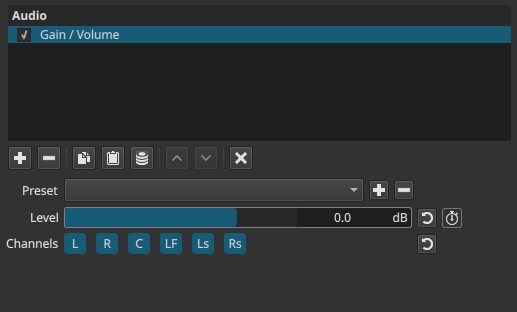
Gain / Volume is a level-control filter. It is often used as a building block before or after other audio processing.
Parameters
Level (-70 to +24 dB)
Controls the amount of gain applied to the selected audio channels.
-
Negative values reduce level (attenuation).
Useful for preventing clipping or lowering overly loud material. -
0 dB
No change to the original level. -
Positive values increase level (amplification).
Useful for quiet recordings or restoring level after processing.
Behavior notes:
- The control is expressed in decibels (dB), representing gain, not perceived loudness directly.
- Large positive values can cause clipping if downstream headroom is insufficient.
Keyframes
The Level parameter is keyframeable. This enables:
- Smooth fades in or out
- Automated level rides
- Scene-by-scene loudness adjustments
Channel selection (toggle buttons)
Determines which audio channels the gain is applied to.
Buttons are toggle switches.

Available buttons depend on the project’s audio channel configuration: Settings > Audio Channels
- L — Front Left
- R — Front Right
- C — Center
- LF — Low-Frequency Effects (LFE)
- Ls — Surround Left
- Rs — Surround Right
Note:
Independent gain per channel requires adding separate instances of the filter.
Auditory characteristics
- Uniform increase or decrease in loudness
- No change in tone, frequency balance, or dynamics
- Can expose noise when boosting quiet material
- Can cause distortion if over-driven
Recommended use cases
- Normalizing clip levels by ear
- Creating fades and level automation
- Compensating level changes introduced by other filters
- Balancing dialogue, music, or effects
- Pre-gain before compression or limiting
- Channel-specific level adjustment in surround projects
Usage notes and tips
- Prefer small adjustments (±1–6 dB) for fine control.
- If boosting significantly, consider adding a Limiter downstream.
- Use negative gain before dynamics processing to preserve headroom.
- For consistent loudness across clips, combine with meters and listening checks.
Limitations
- No automatic loudness normalization
- No peak protection or limiting
- Can clip if pushed too far
- Does not address dynamic range issues by itself