This generates a synchronized audio beep (“bip”) and white visual flash on a black background at a fixed interval.
Both the sound and the flash occur at the same time, repeating according to the selected frequency.
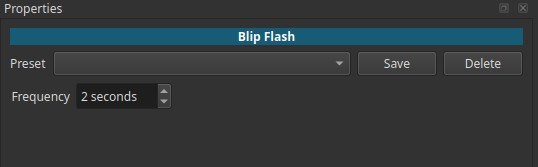
Blip Flash is a generator, not a filter.
Its control is available in the Properties tab of the generated clip.
What a blip/flash signal is (historical context)
Synchronized audio and visual cues have long been used in film, television, and broadcast engineering as timing references.
Historically, similar signals were used to:
- Verify audio - video synchronization
- Provide clear temporal markers
- Test signal paths and monitoring chains
- Cue operators during playback or transmission
A well-known example is the “2-pop” in film workflows:
a short beep and visual cue placed exactly one second before program start.
The Blip Flash generator generalizes this idea into a repeating reference signal.
Generator behavior
- Produces an animated video clip with audio
- Black background with a brief white flash
- A short audio beep occurs exactly in sync with the flash
- The pattern repeats at a constant interval
The clip can be trimmed, looped, or extended like any other media.
Parameters
Frequency (1 - 10 seconds)
Defines the interval between each bip/flash event.
-
1 second
Flash and beep occur every second. -
Higher values (e.g. 5 - 10 seconds)
Flash and beep occur less frequently.
This value controls timing, not pitch or volume.
Visual characteristics
- Full-frame white flash
- Black background between flashes
- No additional graphics or motion
- High contrast for immediate visibility
Audio characteristics
- Short, percussive beep
- Broadband, attention-grabbing sound
- No pitch variation
- Occurs only at the flash moment
Contemporary use
Today, Blip Flash is used mainly as a technical or stylistic reference, not as a consumer-facing element.
Common modern uses include:
- Audio/video synchronization testing
- Verifying delay or latency in playback systems
- Timing reference during editing or demonstrations
- Visual and audio cueing in tutorials
- Intentional minimalist or “technical signal” aesthetics
Use with other filters
Blip Flash is often combined with filters depending on intent:
-
Gain / Volume
Adjust beep loudness. -
Color grading
Change flash color or the black background for creative use. -
Blend modes like “Screen”
Overlay Blip Flash on footage as a flashing element.
Usage notes and tips
- Use short frequencies for sync testing.
- Use longer frequencies for cueing or demonstrations.
- Because the signal is repetitive, trim the clip to the required length.
- Always preview playback to confirm timing.
Limitations
- No control over beep pitch or waveform
- No control over flash duration
- Fixed visual style
- Not a substitute for precise measurement tools