Exchanges the audio content of two selected channels within the same clip.
This filter is used to correct channel placement errors or reassign content when channels are wired or mapped incorrectly.
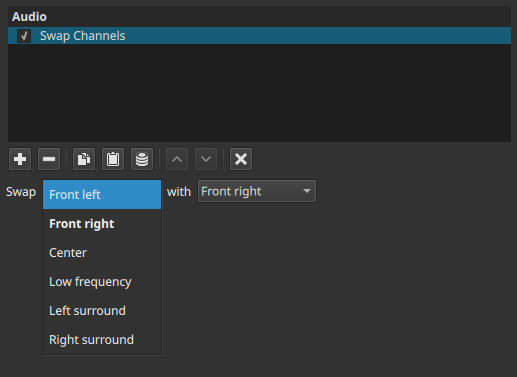
Swap Channels is a channel-routing utility filter. It does not change loudness, tone, timing, or dynamics.
Parameters
Swap
Selects the first channel to be exchanged.
The available options depend on the project’s Audio Channels setting.
With
Selects the second channel to be exchanged.
When the filter is active, the audio content of the two selected channels is swapped.
Channel availability
The channels listed depend on the project configuration in Settings > Audio Channels.
1 (Mono)
- Swap: inactive
- With: inactive
With only one channel, there is nothing to exchange.
2 (Stereo)
-
Swap / With:
- Left
- Right
Allows swapping the left and right stereo channels.
4 (Quad / Ambisonics)
-
Swap / With:
- Front left
- Front right
- Left surround
- Right surround
Any two channels among the four can be exchanged.
6 (5.1 Surround)
-
Swap / With:
- Front left
- Front right
- Center
- Low frequency
- Left surround
- Right surround
Provides full flexibility to correct or rearrange channel placement.
What this filter does
- Exchanges audio between two channels
- Preserves original levels, timing, and frequency content
- Operates only while the filter is active
- Does not permanently modify the source audio
Disabling or removing the filter restores the original channel layout.
Auditory characteristics
- Sound appears to move from one speaker to another
- No change in loudness or tone
- No added resonance, echo, or artifacts
- Effect is purely positional
Recommended use cases
- Fixing reversed left/right stereo recordings
- Correcting misrouted surround channels
- Swapping dialogue accidentally recorded in the wrong speaker
- Repairing imported files with incorrect channel order
- Adjusting channel layout before further processing
Example usages
-
Stereo channels reversed
- Swap: Left
- With: Right
- Result: Correct stereo orientation
-
Dialogue in wrong surround channel
- Swap: Center
- With: Front left (or right, depending on error)
-
Misplaced bass content
- Swap: Low frequency
- With: another channel (for correction purposes)
Usage notes and tips
- Use Swap Channels when audio content is in the wrong channel, not when it needs blending.
- For duplicating or copying audio, use Copy Channel instead.
- For silencing a channel, use Mute.
- Place this filter early in the audio filter chain for routing corrections.
Limitations
- No mixing or blending
- No keyframing
- No time-based behavior
- Only two channels can be swapped per filter instance, but you can use more than one of the same filter