Copies the audio signal from one channel to another within the same clip.
This filter performs a direct channel duplication, replacing the destination channel with the source channel’s signal.
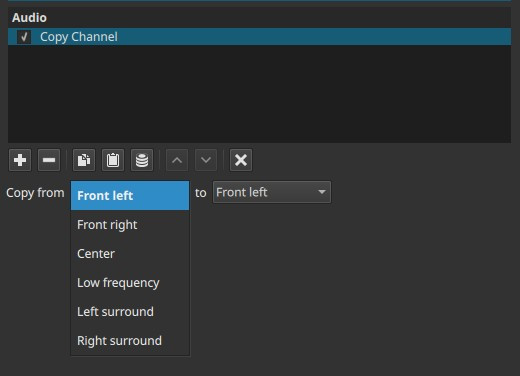
Copy Channel is a routing utility filter. It does not mix, sum, pan, or process audio levels or frequencies.
Parameters
Copy from
Selects the source channel whose signal will be copied.
The available options depend on the project’s Audio Channels setting.
To
Selects the destination channel that will receive the copied signal.
The destination channel’s original content is replaced by the source channel.
Channel availability by project configuration
Check Settings > Audio Channels
1 (Mono)
- Copy from: inactive
- To: inactive
With only one channel, there is nothing to copy or replace.
2 (Stereo)
-
Copy from:
- Left
- Right
-
To:
- Left
- Right
Allows copying one stereo channel into the other, which is useful when one channel is empty or silent.
4 (Quad / Ambisonics)
-
Copy from / To:
- Front left
- Front right
- Left surround
- Right surround
Enables duplication between any of the four channels.
6 (5.1 Surround)
-
Copy from / To:
- Front left
- Front right
- Center
- Low frequency (LF)
- Left surround
- Right surround
Allows precise channel reassignment within a surround mix.
What this filter does
- Copies audio one-to-one from a source channel
- Replaces the destination channel’s content
- Does not blend or sum channels
- Does not change loudness, timing, or tone
- Operates only on the selected clip
Auditory characteristics
- Destination channel becomes identical to the source channel
- Original destination audio is lost for the duration of the clip
- No change in overall loudness unless combined with other filters
Recommended use cases
- Fixing incorrectly routed channels
- Duplicating a mono signal across multiple channels
- Replacing a missing or silent channel
- Copying dialogue into the center channel in surround projects
- Preparing material for further channel-specific processing
Usage notes and tips
- Use Mute to silence unwanted channels before copying, if needed.
- To copy one channel into multiple channels, add multiple instances of the filter.
- This filter is often used early in the filter chain for routing corrections.
- For blending channels instead of replacing them, use mixing or Downmix filters instead.
Limitations
- No mixing or gain control
- No keyframing
- No time-based behavior