Adjusts the stereo position of audio by distributing signal level between the left and right channels.
This filter is used to place sound toward one side of the stereo field or to animate movement across it.
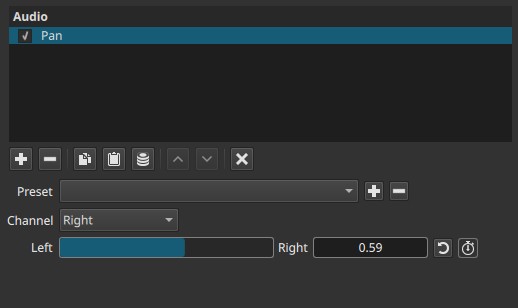
Pan is a stereo level-distribution filter. It does not change tone, timing, or pitch.
Parameters
Channel
Selects which channel is treated as the source for the panning operation.
-
Left
Uses the left channel as the source signal. -
Right
Uses the right channel as the source signal.
The selected channel is redistributed between left and right outputs according to the pan slider.
Important behavior note:
The Pan filter does not mix both channels together. It takes the selected channel and spreads it across the stereo field.
Left → Right (0.00 - 1.00)
Controls where the selected channel is placed in the stereo field.
-
0.00
Output is fully left. -
0.50
Centered (equal level in left and right). -
1.00
Output is fully right.
Intermediate values place the sound proportionally between left and right.
Keyframes
The Left → Right slider is keyframeable.
This allows:
- Smooth panning movement across the stereo field
- Sound traveling from left to right (or the reverse)
- Position changes over time within a clip
Keyframed panning is evaluated continuously during playback.
Auditory characteristics
- Changes perceived position of sound
- Loudness remains similar, but distribution changes
- Extreme positions isolate sound to one speaker
- Center position places sound equally in both speakers
Recommended use cases
- Positioning dialogue or effects in stereo space
- Correcting recordings where sound is biased to one side
- Creating motion effects (e.g. passing objects)
- Separating overlapping sounds in a mix
- Creative stereo placement
Example usages
-
Center a left-only recording
- Channel: Left
- Left → Right: 0.50
-
Move a sound from left to right
- Channel: Left (or Right, depending on source)
- Animate Left → Right from 0.00 to 1.00
-
Place an effect slightly off-center
- Channel: Left
- Left → Right: 0.35 or 0.65
Usage notes and tips
- Choose the channel that actually contains the sound you want to pan.
- For subtle placement, avoid extreme values.
- For stereo recordings where both channels matter, consider other mixing tools instead of Pan.
- Always monitor on stereo speakers or headphones for accurate placement.
Limitations
- Operates only on one selected channel at a time
- Does not preserve stereo width when applied to a single selected channel
- Not suitable for surround positioning (Front/Rear)
See also: Balance Audio Filter