Adjusts the relative levels between audio channels to reposition sound within a multi-channel field.
The filter redistributes existing audio energy between channels; it does not add spatialization or effects.
The available controls and layout depend on the project’s audio channel configuration.
Balance is a spatial level-mapping filter. It is evaluated per frame and can be animated with keyframes.
Availability and UI behavior
The Balance filter adapts its interface based on:
Settings → Audio Channels
1 (Mono) or 2 (Stereo)
-
The filter exposes one slider:
- Left - Right (keyframeable)
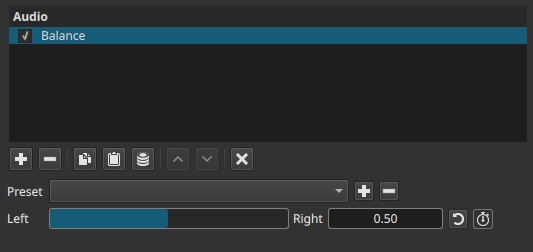
This provides a simplified balance control for projects without discrete surround channels.
4 (Quad / Ambisonics) or 6 (5.1 Surround)
-
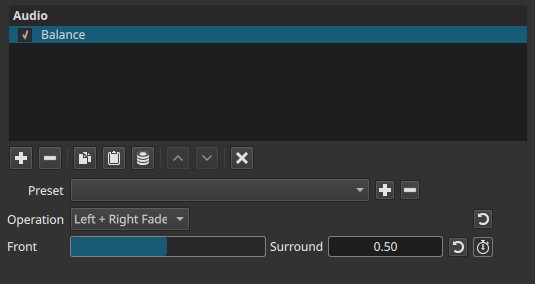
The filter exposes:
- An Operation dropdown
- One slider at a time, whose meaning depends on the selected operation
-
All sliders are keyframeable
-
Only the slider relevant to the selected operation is visible
Parameters (Mono / Stereo projects)
Settings → Audio Channels → 1 (Mono) or 2 (Stereo)
The filter has one slider:
Left - Right (0.00 - 1.00)
Balances audio between the left and right channels.
-
0.00
Full emphasis on the left channel -
0.50
Centered balance -
1.00
Full emphasis on the right channel
Notes:
- In mono projects, this control determines how the mono signal is distributed between left and right output.
- In stereo projects, it adjusts the relative level between the existing left and right channels.
In mono or stereo projects, this control provides a conceptual balance rather than discrete channel routing.
Parameters (Quad / 5.1 projects)
Operation
Selects which channel relationship is being adjusted.
The visible slider and its meaning change based on this selection.
Front Balance → Left - Right (0.00 - 1.00)
Balances left vs right levels within the front channels.
- 0.00 → Front-left emphasis
- 0.50 → Centered
- 1.00 → Front-right emphasis
Surround Balance → Left - Right (0.00 - 1.00)
Balances left vs right levels within the surround channels.
- 0.00 → Surround-left emphasis
- 0.50 → Centered
- 1.00 → Surround-right emphasis
Front + Surround… → Left - Right (0.00 - 1.00)
Balances left vs right across all channels, front and surround together.
- 0.00 → Left-side emphasis
- 0.50 → Centered
- 1.00 → Right-side emphasis
Left Fade → Front - Surround (0.00 - 1.00)
Adjusts front vs surround balance for the left-side channels only.
- 0.00 → Front-left emphasis
- 0.50 → Balanced
- 1.00 → Surround-left emphasis
Right Fade → Front - Surround (0.00 - 1.00)
Adjusts front vs surround balance for the right-side channels only.
- 0.00 → Front-right emphasis
- 0.50 → Balanced
- 1.00 → Surround-right emphasis
Left + Right Fade → Front - Surround (0.00 - 1.00)
Adjusts front vs surround balance for all channels simultaneously.
- 0.00 → Front channels emphasized
- 0.50 → Balanced
- 1.00 → Surround channels emphasized
Keyframes
All sliders are keyframeable.
This enables:
- Animated panning across left/right channels
- Moving sound from front to surround over time
- Dynamic spatial rebalancing during a scene
Parameter interaction
- Operation determines which channel relationship is affected.
- The visible slider always operates on a 0.00 - 1.00 normalized scale.
- Changes redistribute level between channels without altering overall timing or adding effects.
Auditory characteristics
- Smooth level transitions between channels
- No added reverb or spatial modeling
- Perceived sound position shifts within the existing channel layout
- Most noticeable on discrete multi-channel systems
Recommended use cases
- Correcting imbalanced mixes
- Repositioning dialogue or effects
- Creating motion across speaker layouts
- Adapting audio for different surround configurations
- Fine-tuning spatial placement without re-encoding audio
Limitations
- Does not create spatial cues from mono sources
- No distance, depth, or elevation control
- Effectiveness depends on playback system
- Stereo playback cannot reproduce full surround intent