Hello,
since I started editing on my new PC using the latest version of Shotcut, I’ve been experiencing frequent audio bugs, especially when I make cuts in the audio track. Most of the time, there’s a clicking sound or some kind of audio artifact that appears right after a cut. I can send a short sample if needed. Basically, it’s an unpleasant click that occasionally happens directly after a cut.
I’ve been searching for a solution for weeks now and have tried various settings and different audio formats for both input and output, but nothing seems to work — the artifacts remain. The only “fix” I’ve found that sometimes helps is shortening the cut section a bit more, effectively cutting out one additional frame in the hope that no new artifact appears. However, this only works if the artifact doesn’t overlap with existing music or commentary.
Unfortunately, the problem occurs quite frequently — roughly every 10 cuts — which becomes noticeable in well-edited commentary videos. I’d really appreciate some suggestions or possible solutions.
I should also mention that this issue never happened on my old PC. I previously had a GTX 1060 and now use a 3060, so I’ve upgraded two generations, which otherwise makes editing much smoother. As I said, the only change is that I’m now using the newest version of Shotcut. It’s definitely not related to OBS, my microphone, or any other equipment — I’ve already checked all of that.
I already saw someone report a similiar issue. But he had a lot more crazy things going on with his audio there. I just have a small click sound. I hope there is an easy solution.
Yo thank u very much. I will try those filters and than give some feedback if and what worked and what didnt! And thanks for making this great project. I actually use shotcut since 2016! Thanks for making it free to use man, and keep up the great work with the updates!
Hello again. I tried both filters now a couple of times and they barely work. I noticed that maybe like 1 or 2 cracks are gone since using the filters and playing around with the settings. But most of the cracks stay the same. Are there any recommended settings for the filters or different solutions? The issue is very annoying.
What happens if you export the video and play it back in a media player? Are there clicks in the exported video? We are trying to narrow down whether the clicks are a source media or processing problem (which would affect export) or a preview problem (which would not affect export).
Im talking about the exported file. I know that the preview has some cracks that get removed when exporting. But the cracks im talking about wont get removed by exporting.
What is the source footage? I’ve had glitches happen with smartphone video because it is variable frame rate, and the seeks for cuts are not precise. The issue is usually fixed by doing Convert to Edit-Friendly on any sources that are variable frame rate.
I’m not saying this is for sure the reason. It’s just one possibility I’ve seen.
I recorded some commentary with OBS. On PC. I also cut on PC. But it doesnt matter even if i download a video from YT or any source those cracks would appear. I really would appreaciate some good settings for the filters. That maximise the chance of detecting and removing the clicks.
I think that would be helpful. We are only guessing what the problem might be for you.
Additionally, can you provide a screenshot of the Properties panel when one of your source clips is selected?
The default filter settings are good settings. If they do not work for you, you should experiment by turning them up and down to see if the settings make any difference. Or, maybe the problem is not something the filters can help with.
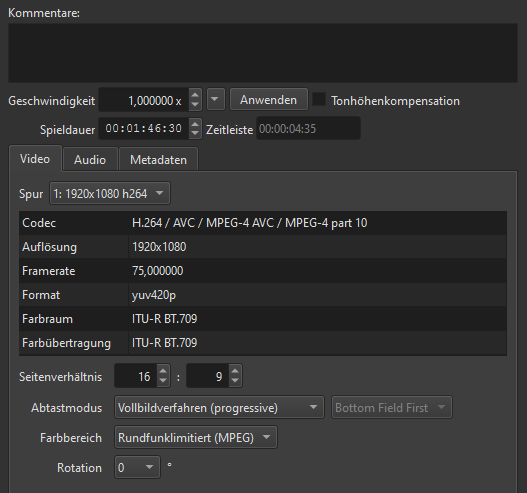
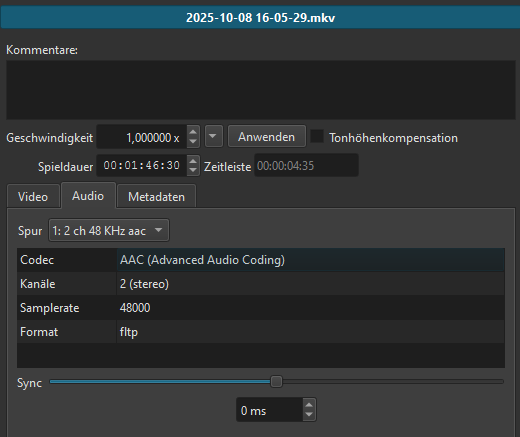
Here are the properties from a clip with the click issue.
I tried many different settings now. I understand the track seam filter settings. The lower, the more clicks get detected. But i dont get the settings of the declick audio filter. Even tho the owner has an explaination linked. I really dont know if its smarter to put the 3 values up or down to maximise the detection.
Here are 3 short clips of my video and the click issue. It appears quiet often. I know they are not that loud but if they appear every 30-60 seconds they really annoy and devalue the quality of the video. Wear headphones so u can hear it properly. Especially the second one is really loud and noticeable.
I also thought about that. But shouldnt it be fine when rendering/exporting it at the same framerate? I can try 60 fps in the future. Or what would be your recommendation?
I also had the issue on downloaded clips from YT with 30 or 60 fps. So i dont think thats the main issue here.
Some clicking can be expected when the waveforms at cuts do not align, which is why the Track Seam audio filter was created. If there are still some, then you can try to add Declick Audio to the Timeline > Output. The latter should be very similar to manually running a ffmpeg command line using its adeclick filter. This is all I can offer in this regard at this time.
We expect it to work. But it is not working for you. This is not a widespread problem that many people are reporting. So we are wondering what might be unique about your project that could be causing a problem. The 75fps is unique.
I wonder what your Video Mode frame rate is. Can you report back with your video Mode?
As a test (just guessing, really), you could try to perform the “Convert” operation on your clip to see if a converted clip also experiences the clicks.
Yeah, you’re right about the 75 fps. That might be causing issues. I’ve just set my OBS back to 60 fps. I didn’t realize it could negatively affect the audio. I’ll try recording the rest of the video at 60 fps and can give you feedback once I’ve recorded and edited the next part.
What exactly do you mean by “Video Mode frame rate”? Do you mean the project’s rendering settings in general, or just the individual video clips? My video and audio were recorded separately, both at 75 fps. The downloaded videos are mostly 60 fps, and they play perfectly fine. I usually render the project at 60 fps.
Converting the clips to 60 fps in Shotcut doesn’t seem to work at all. It renders the clips, but when I try to open the converted file, I get an error code saying the format is not supported: 0xc00d5212. Maybe I’m doing something wrong with the conversion settings. I’m not really a tech/coding guy, so I’m not sure.
If you do not explicitly set a Video Mode, Shotcut tries to guess one from your first clip. In my experience, I get the best result if I set the Video Mode specifically to what I want to render/export to.