The Levels filter adjusts the tonal range of an image by remapping how input brightness values are distributed between black, midtones, and white. It is one of the most important tools for correcting exposure, contrast, and color balance.
Levels works by redefining:
- What is considered black
- What is considered white
- How midtones are distributed between them
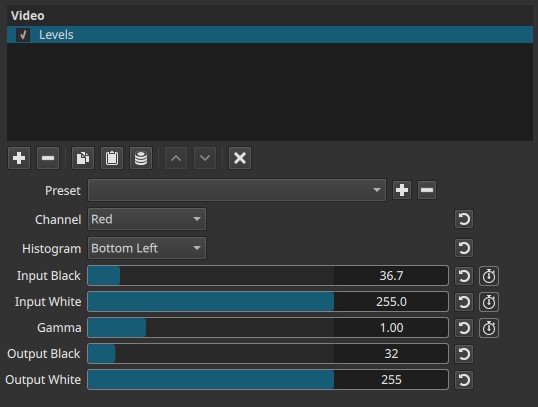
This filter can be applied globally or per color channel.
Parameters
Channel
Selects which channel the Levels adjustment applies to:
-
Value (default)
Adjusts overall luminance without changing color balance -
Red, Green, Blue
Adjust individual color channels for color correction or creative grading
Histogram
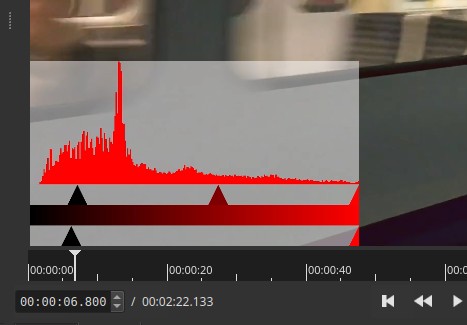
Displays a live histogram overlay to assist with adjustment.
Available positions:
- Top left
- Top right
- Bottom left
- Bottom right
- None
Notes:
- The histogram is a visual aid only
- It will be rendered into the video output unless set to None
- The histogram size is fixed and constrained to the viewer corner
- Remember to set Histogram to None before exporting, unless you need to include it
Input Black (0-255) - keyframeable
Defines the black point of the input signal.
- Values below this level are mapped to pure black
- Raising Input Black increases contrast and removes shadow detail
Input White (0-255) - keyframeable
Defines the white point of the input signal.
- Values above this level are mapped to pure white
- Lowering Input White increases contrast and removes highlight detail
Gamma (0.01-4.00) - keyframeable
Adjusts the brightness of midtones without changing the black or white points.
-
Values < 1.0
Darken midtones -
Values > 1.0
Brighten midtones
Gamma does not change the endpoints, only how values are distributed between them.
Output Black (0-255)
Defines the output black level.
- Raises or lowers the darkest output value
- Useful for limiting contrast or matching broadcast ranges
This parameter cannot be keyframed.
Output White (0-255)
Defines the output white level.
- Compresses or expands the output dynamic range
- Useful for broadcast-safe or stylistic output control
This parameter cannot be keyframed.
Parameter interaction
- Input Black / White define which parts of the input signal are clipped
- Gamma reshapes midtones without clipping
- Output Black / White remap the final output range
Channel-specific adjustments affect color balance; Value affects luminance only.
Why Levels is important
Levels is a foundational correction tool because it allows you to:
- Recover contrast from flat or washed-out footage
- Correct underexposed or overexposed material
- Balance color casts using per-channel adjustments
- Prepare footage for further color grading
- Match shots from different cameras or lighting conditions
Incorrect levels can make footage look dull, crushed, clipped, or improperly colored.
Visual characteristics
Typical effects include:
- Increased or reduced contrast
- Brighter or darker midtones
- Corrected black and white points
- Color shifts when adjusting individual channels
Recommended use cases
- Exposure correction
- Contrast normalization
- Color balance correction
- Shot matching
- Pre-grading cleanup
Levels is often one of the first filters applied in a color correction workflow.
Limitations
- Histogram overlay must be disabled before export
- Output Black and Output White are not keyframeable
- Aggressive settings can clip shadow or highlight detail
- Not a full color grading solution by itself