Hi, I was wondering if it’s possible to display for instance subtitles in French and below the subtitles in English? How can I modify the positionning of the subtitles on the screen? Thanks a lot
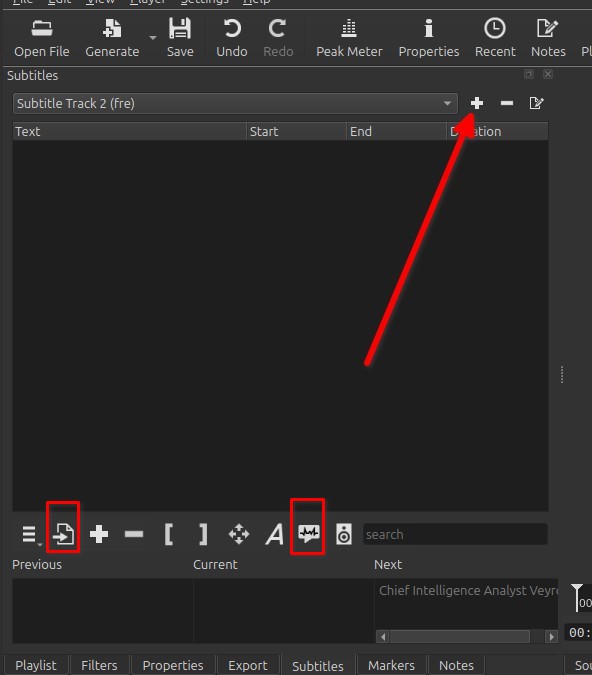
Yes, in the Subtitle tab add [+] a Subtitle track, and import [→] it or use the Text to Speech button.
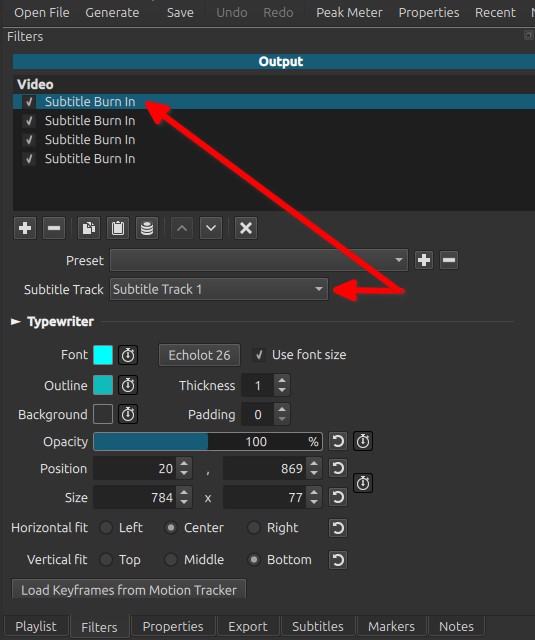
Then, If you use the filter Burn In you can now chose which subtitle track you want to burn in and add as many Burn In as you want with different options like the position and a different subtitle.
1 Like
Thanks a lot. Is it possible to do the same with the function ‘Generate text on timeline’ instead of ‘Burn in subtitles on output’?
You will need to add the text manually, something like copy/paste for each part of your subtitle. Thus adding this “filter” a great number of time.
IMHO, it’s better, faster, easier, and fully automated by using the “Subtitle: Burn In” filter for each version of your subtitle. But maybe I misunderstood what do you want exactly…
yes, all that you need to do is to choose the current subtitles at the top of the Subtitles panel before you trigger the action. And do it for each one that you want to.
1 Like
Yes it makes more sense to use ‘burn in’ in that case. Thanks a lot.