Thanks Dan - downloaded. I got the nightly build from GitHub earlier today. Is the one you sent exactly the same zip file?
It seems to. I used it quite extensively tonight, and no crashes so far, with CTRL + I. I can send an app log file if that would help you or shall I assume it’s fixed, then wait and see if it crashes then send a report only if it does crash?
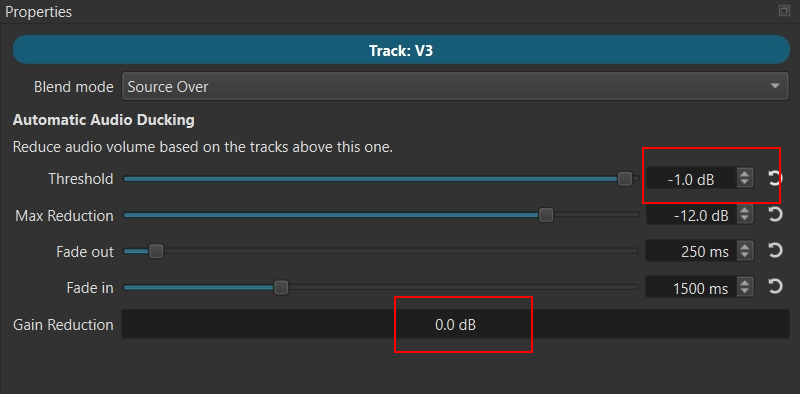
I also worked out how to switch it ON, by moving the Threshold down a notch. Whilst I found it worked, did think, however, that this was just a little unintuitive, especially since you then end up with 2 values that change, the threshold going down to -0.1, and the Gain reduction changing from OFF to 0.
Of course, it makes sense because they are two different things. But I admit it did confuse me to start off with. (Bear in mind I can get easily confused though )…
I’ts OK if you want to leave it like that but personally I think a dedicated button somewhere marked “Automatic Ducking ON/OFF” (toggle) would make it crystal clear. Just my thought.
With a checkbox or button, you then need to adjust two things to turn it on because a threshold of 0 does nothing. There is a tooltip on Threshold which mentions that. It is OK to default filters to enabled because you have added it. But here, we use Properties because it is a little more involved than the simple addition of a new track filter. I suppose if there is a checkbox, then Threshold could default to something other than 0.
@shotcut and @brian, just a thought – on opening Properties, checkbox OFF by default, with NO sliders / labels visible. Just blank.
Checkbox ON, all sliders become visible. Threshold set to a fairly high level, say 75%.
Would that work, and is it possible?
I made a short demo (mock-up) of my idea. The sliders would be hidden, and threshold could be 0, when off -but change to a certain value when on. It’s just a suggestion - I don’t know if it’s practical though.
Here’s another audio ducking demo. I screen- captured (with ShareX) some random music from Radio 2, and separately some random studio discussion from Radio 5 (just spoken, no background) and set both videos up for automatic audio ducking.
Shotcut is the answer! Two days ago, I thought it would be awesome to have volume control on the tracks, instead of having to use a filter; and here we are! This program just keeps getting better by the day. I used Premiere for years until one day the play button stopped working randomly, and I would have to close the program, clear the cache and restart. I decided to look elsewhere, and after trying Davinci, I landed here. Your easy proxy setup, dissolve transitions, and keyframing is what got me to stay. Thanks for such an amazing software!
I would like to take this opportunity to thank the Shotcut developers and users for their patience and great suggestions in helping make Shotcut the greatest FOSS video editor. Thank you, guys, and I hope this new version gets widely adopted and everyone likes the updates. Thanks!
However, in this beta, I noticed something that I kindly ask others to check: adjustment layers should not affect audio channels at all. I noticed that when I applied a fade-in to an adjustment layer, the underlying audio tracks also faded in. Then I tried putting a Mute filter on the adjustment layer; the mute did not affect the audio tracks, but the audio fade-in did.
That said, it wouldn’t be a bad thing if adjustment layers could also apply to audio tracks! In fact, it would be a game-changer to have that feature—for example, being able to add a reverb effect to an adjustment layer and place it across all my Foley tracks.
Also, could I kindly ask where I can download the beta 26.9.15 .exe file?
Audio filters on an adjustment clip are working for me including Mute. However, it applies to the sum of all audio from any kind of track; it is not layering-sensitive like it is for video. I tested the latest daily build and not the beta. That behavior will not be addressed; only documented and left for discovery by others. It is like putting an audio filter on Output but you might prefer to the control the timing this way instead of trimming the filter in Keyframes. As for fade in and out (audio and/or video) on adjustment clip; it does not make much sense to me, but I leave it that way in case someone finds a need.
If it’s not too much trouble, I’d like to ask you to provide these “nightly builds” in AppImage format for Linux as well. I’m also interested in testing how effectively the fixes work.
It works, but it is not considered trustworthy and requires more effort to actually get it. It’s all I am providing right now. You can try to figure it out or wait til release.
I got a problem with audio auto ducking and the other one proprieties on image.
When selecting the track the FIRST time, it is there, I select a clip on that track, then select the track back, no more access… I need to restart shotcut

 )…
)…


