Hello,
How can I disable auto fade in and fade out ?
Thanks in advance !
Marcos
Hello,
How can I disable auto fade in and fade out ?
Thanks in advance !
Marcos
Obviously, drag the sliders to their leftmost, minimum positions.
maybe add fade in and fade out filters and set 00:00:00 helps too, correct ?..
but please think to get the opt out to this automatic fade in and out …
thanks !
No and no. There is only auto fade in and out around automatic audio ducking. Maybe you do not understand that options under a heading “Automatic Ducking” only apply for that feature even though that should be obvious. If it is not, that is on you. I am not going to respond to your comments from here on.
It is off by default. After the release, we can get the documentation updated to help people understand how it works. Some people will understand it intuitively based on their past experience. But some people will not understand if they have not used a tool like that in the past.
thanks for the help … I searched about this auto duck … preparing to record to my youtube channel … thanks … I haven’t use it … maybe in future
About the Adjustment Clips.
I haven’t played with them a lot, but that seems like a very useful feature 
I suppose they are basically meant to be used with filters that change the image aspect of the tracks below. Like hue, color, saturation, brightness, levels etc…
Other filters like for example SP&R and Crop won’t work.
I just wonder if there is a way to apply fade in/out to adjustment clips. Or plans to add this in the future?
Right now the in/out transitions are pretty brutal. I’m guessing people might like to be able to make them smoother, or maybe apply a transition between 2 adjustment clips?
Fade filters have some effect only when unchecking Adjust opacity instead of fade with black.
Since the beta transitions and some filters have been blocked that do not make sense:
Other filters as you pointed out will not work as expected, and there are no plans to add support for them.
I agree that adding SP&R, Crop or any other similar filters to an adjustment clip doesn’t make much sense.
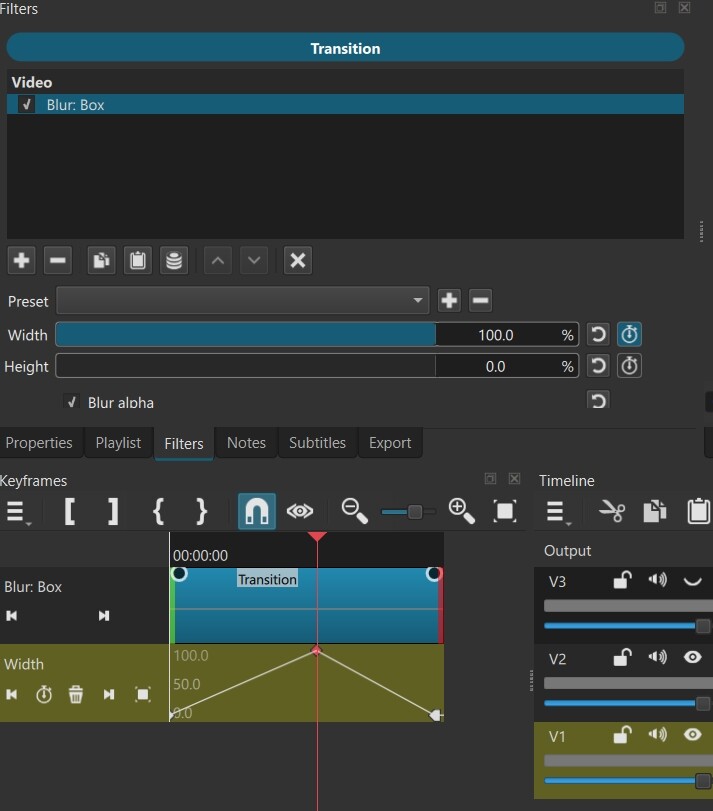
I experimented, using an adjustment clip to add a blur:box effect to an existing dissolve transition. Great for a non-destructive transition. I will find this very useful.
Quick demo:
Crash report - I experienced two crashes this morning. It’s hard to pinpoint exactly a connection as to why I thought the crashes happened. I didn’t get to do any editing, though - on both occasions I was trying simply to add two mp4 videos, one on V1 and the other on V2.
The first video worked OK after I dragged it from the playlist to the timeline. I have auto-create tracks OFF, so I used CTRL + I to create a new track, and dragged it to V2. Very shortly after this - the crash.
I’m sure I have done this on other occasions, where no crash happened, so it does seem to be intermittent.
After the second crash, I saved the shotcut-log text file (attached). I changed my username to XXXX. Hopefully this might give a clue to the crash.
I did wonder if it was similar to this?
Windows 11.
PS I am using the portable ZIP version.
shotcut-log-JR.zip (5.6 KB)
Further to last post - true to form, I tried it again, and there was no crash. But I saved the app-log text file again, for direct comparison, if that is useful.
Shotcut-log-02 (working) JR.zip (5.4 KB)
[EDIT] @shotcut - I made some enquiries with Claude and i though his response would be useful. I found details of the crash via Windows Event Viewer, and sent him the result.
Here is part of the conversation I had with Claude. Hope it gives a clue.
Claude response.zip (1.7 KB)
What are the advantages of using an Adjustment Clip for this Jon?
You could add the blur filter + keyframes directly to the transition.
Same result and also non destructive.
Hi @musicalbox -well, yes, you can add the blur to the transition, then if you change your mind, you can de-select or delete it.
My intuitive thinking about putting the blur on the adjustment clip is just that, for me, it gives you a little more control over the blurs. Just one example - say you have a bunch of transitions on a track, and you want to view a video with or without the blur effect (say for comparison), you can either 1) hide the adjustment clip track to hide all the blurs (one click), or 2) select all the adjustment clips and delete them (two easy operations) to delete all the blurs in one go.
Without it, although it’s easy to copy all the blurs to all the transitions, to hide them or delete them you would have to do it within each transition separately.
I admit there’s not a lot of difference though. Good point. Plus I know you are a fan of having as few tracks as possible…  and by doing it this way, yes, you will need two tracks…
I think it is the same as the other Ctrl+I crash that was fixed.
That sounds like a good reason.
Great, thanks.
[EDIT] - @shotcut - another crash this morning. I still had “automatic tracks” off (I forgot to change it), and used CTRL + I again. FWIW, the last entries in the shotcut-log file are below - just in case you are not 100% sure this is the problem. (If you are sure, please ignore)! :
[Debug ] Mlt::VideoWidget::reconfigure mlt_image_format yuv420p mlt_color_trc color_trc bt709
[Debug ] Player::setIn in -1 out 6285
[Debug ] Player::setOut in -1 out -1
[Debug ] TimelineDock::setSelection Changing selection to QList(QPoint(1,1)) trackIndex 1 isMultitrack false
[Debug ] TimelineDock::setSelection Changing selection to QList() trackIndex -1 isMultitrack false
[Debug ] Timeline::MoveClipCommand::redo track delta 0 position delta -211
[Debug ] MultitrackModel::removeBlankPlaceholder REMOVE PLACEHOLDER
[Debug ] TimelineDock::setSelection Changing selection to QList(QPoint(0,1)) trackIndex -1 isMultitrack false
[Debug ] TimelineDock::setSelection Changing selection to QList(QPoint(0,0)) trackIndex -1 isMultitrack false
[Debug ] TimelineDock::setSelection Changing selection to QList() trackIndex -1 isMultitrack false
[Debug ] TimelineDock::setSelection Changing selection to QList(QPoint(0,0)) trackIndex -1 isMultitrack false
[Debug ] Timeline::LiftCommand::redo trackIndex 0 clipIndex 0
[Debug ] Application::~Application exiting
[EDIT] @shotcut, IGNORE this! I just downloaded 26.9.15 (latest build) and it all seems working. thanks!
In my case above, though, I agree, there’s not much in it between adding filters individually to each transition. I suppose the main use of an adjustment track would be to apply a filter(s) to a complete edited video.
I thought of another use case - apply an audio effect (say, reverb) to an edited audio track. I think it’s going to be very useful…
I couldn’t wait to try out the “automatic audio ducking” feature! 
After a little bit of tweaking I came up with this short demo.
What a great new feature. Congratulations, Dan, Brian and any other contributing devs.
Poem: Daffodils
Poet: William Wordsworth
Actor: Ralph Fiennes
Music: Beethoven’s Pastoral Symphony (Pastoral = countryside. See what I did there… ?)
Pure class! Just like Shotcut…
@jonray I want to give you (and any others who want to try) a signed nightly build to check if it resolves the crashes you are experiencing after tracks get added.
This also makes the Auto Ducking more clear that it is OFF by default until you reduce the Threshold.
http://builds.us.meltytech.s3.amazonaws.com/shotcut/shotcut-win64-26.9.15.zip
Oh, I see you edited your reply above to say it is resolved. Great! But here it is for others who might be frustrated by that.