That recording is nice, can now apply effects without the noise getting in the way.
Attached, two flac files with some chorus, EQ and transient expansion.
This last one is rather interesting, it expands (amplifies) the audio but one has control
over parameters that can be used to only expand the parts with higher or lower rate of decay or attack.
Works pretty well for things like guitars and percussion.
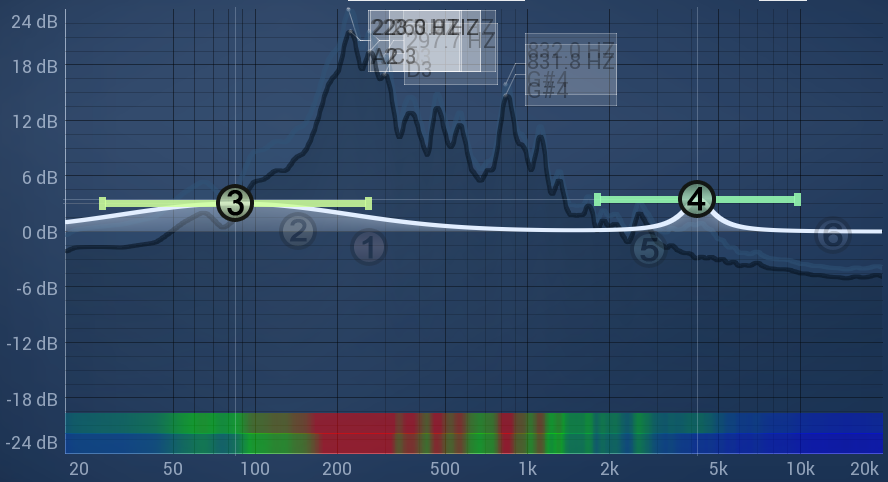
With the EQ, just gave it a bit of “oomph” at the low end and mids.
Makes the guitar (IMO) stand out a bit more.
That is exactly what threw me off, not used to working with violins.
I get it now, was a good learning experience.
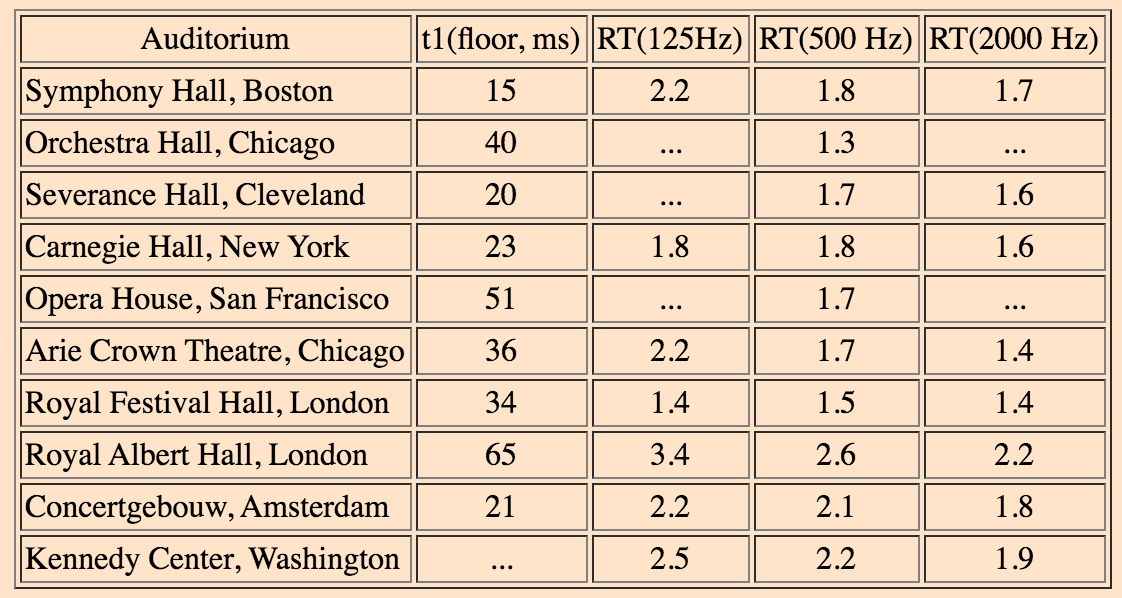
I spent a few hours on Youtube listening to exactly that and the average values of
reverb time in famous venues like the Royal Albert Hall.
So on average, a value of 1.5 S seems to be the norm at around 1KHz.
What I also did is record small parts of single instruments (with abrupt endings of the main sound but with a prolonged reverb) in these Youtube videos.
These proved quite handy in estimating, I repeat estimating, the RT-60 of any particular venue.
For example, I listened to a few performances of Belgrade Baroque held at the Belgrade City Hall.
The RT-60 of this venue I estimate at around 1.9 S at mid to low frequencies.
When I have a bit of time, will redo the Corelli recording with more reverb.
Yes please, the more the better.
It’s been very interesting and very happy to listen to more.
Always good to broaden ones musical horizons.
This is also dependent on the style of music. Classical pieces (or even romantic/impressionistic and later) require more reverberation, and baroque works require less. This is because of extensive use of ornamentation in this style of music, which will get lost if there is too much reverb.
But RT60 is not the only parameter to consider. It is vital to set the right values for damping and bandwidth to get a natural-sounding reverb. Earlier in this thread I’ve discribed my approach to this, maybe it can be of help. But I should confess that mastering the reverb is still work in progress for me.
Absolutely, although I highlighted RT60 in my previous post, but as you say, other parameters like damping and bandwidth do play an important role.
What my experience has been with other genres, one adds reverb per track or stem
and the (mostly) over-ridding factor is what it does sonically in context with the whole mix.
Most recordings done in studio have very little reverb and is added afterwards.
What I meant was I need to stop going down the rabbit hole. I like what I’m hearing from the borrowed H5, I think I’m just going to get that. Apart from its functions, I also like the shock mounted capsule and metal bars that prevent gain knobs from moved accidentally. Thanks again for your suggestion of Zoom recorders!
Thank you Paul for the screen shot and flac. Very interesting sound! Although my ears are not used to hearing the guitar that way, I will listen to them a few times through out next week and see what happens.
The Zoom recording was a little on quiet side, amplified 12db in Audacity:
Did warn you that I normally do rock and pop and hence guitar tracks (and other instruments) are very rarely left as recorded without some reverb, EQ, flanging or even some distortion.
Nothing wrong with more level, just leave yourself some headroom for further processing like EQ, or maybe you want some overdrive/distortion effects
I have one of these as a track insert effect, really nice but not for your guitar recording.
This is great. I’m looking to make something similar to this but with a choir something like this :-
I’m completely new to video editing software but am very experienced with many DAW’s.
I noticed in your video you had 5 tiles and I’m wondering how many Shotcut can do?
Also, some of the choir and musicians will be using their phones to film and record the audio but others have studios and will want to record the film on their phones but will record the audio into their studio setups.
Is it possible to mute the phone audio within Shotcut?
I would like to be able to have a background image and various pieces of text but don’t know how to do this yet. Is it possible to add frames around each members video tile?
Also is it possible to mix the audio of each video clip before uploading to ShotCut?
Don’t know, you will have to try it.
It all depends on the resolution of each video plus your CPU and RAM.
Eventually it will get to a point where playback and editing will be terribly slow.
It will vary as per reasons above, each situation will be unique, try it and see.
No doubt getting clips from so many sources will mean all sorts of weird and wonderful frame rates.
I suggest you convert all the videos to a fixed frame rate first, if you are in the US, go with 30FPS.
If in Europe go with 25FPS.
Yes.
You will have to get better acquainted with the filters/effects in Shotcut, but in a nut shell, yes possible.
If you want to go that route.
Some like to mix and synch up the audio in Shotcut, others in a DAW.
The workflow and your preferences will mostly dictate as to which way is best.
This is not some special tile effect or something like that. I’ve just put every video on a separate track and positioned videos on screen using “Size and Position” effect. So this is just a question of how many video tracks your system can handle.
No problem whatsoever. There is dedicated switch for each track.
No problem. Just add one more video track and load your image. Text can also be added using a filter.
No problem. Just add an audio track.
This is exactly what I did. I have extracted the audio from video files using ffmpeg, mixed it separately, added the mixed track to a project, and then synchronized mixed track with videos. So original sound was muted and replaced with separately mixed track.
Shotcut is a great tool, but in my opinion audio mixing is best done in specialized software rather than in video editor.
Actually, this does not seem to be a problem. ShotCut successfully deals with different framerates/formats/etc. The release output will be as specified in export settings.
Audio tracks were extracted and mixed separately into 48 kHz FLAC, as I’ve explained before.
As you can see, there are plenty of different frame rates, sampling frequencies and bitrates. No problems whatsoever. Just imported everything into Shotcut, edited and exported.
Many mobile phones record with a variable frame rate by default, unless changed.
Others don’t even have the option for the user to change it.
The audio may well be variable as well.
 I like what I’m hearing from the borrowed H5, I think I’m just going to get that. Apart from its functions, I also like the shock mounted capsule and metal bars that prevent gain knobs from moved accidentally. Thanks again for your suggestion of Zoom recorders!