OK, I added these but without snapping.
1 Like
Make Timeline Zoom Fit Button Toggle to Previous Zoom Level
Do not ask for new features in a beta.
1 Like
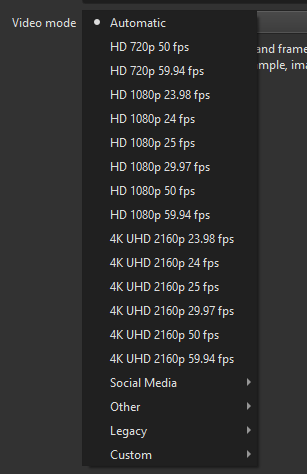
Suggestion: move the 720p modes into the Other submenu. I can’t imagine they are very commonly used especially at 50/60fps.
1 Like
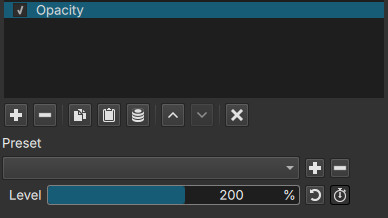
Yes, because it allows you to decrease opacity of something that is already translucent. Think about an image that has 50% opacity and you want to make it less translucent: you need to increase opacity. Not changed in this version.
4 Likes
I did
I am thinking about changing these top-level HD/4K video modes from “29.97 fps” → “~30 fps” and “59.94” → “~60”. Of course, if a user goes into the details they can see exactly what “~” means. Do the people reading this agree this is better?
- Yes
- No
- I do not understand
0
voters
2 Likes
I probably don’t understand 
How does seeing ~60fps can be better than 59.94fps ?
People are used (I guess) to see 23.98 - 29.97 - 59.94 in their devices and apps.
Wouldn’t it make it confusing for a lot of users to see items that says:
approximately 30fps( ~30fps) or approximately 60fps ( ~60fps)
in the Video Mode main list?
2 Likes
I voted “no”, because if I understood correctly, people will see in the menu something like this?
~24fps
24fps
~30fps
30fps
~60fps
60fps
Which I found very confusing, I’m far to be a pro, just an amateur, and I know what is 59.94fps, I would be very confused to see “~60fps” instead and below another “60fps”…
Those numbers 23.98 - 29.97 - 59.94 are quite standard and users come across it multiple time with most (if not all) video editors
I also think that there will always be people asking “what’s the difference between 29.97 and 30 fps?” if we change that to “~30fps” they will ask “What’s the difference between ~30fps and 30fps?” instead 
Or.. maybe do like the “Alt=” in html when we hover the mouse on something, it appear a little popup saying “~30fps” on the number/row “29.97fps”?
I could be wrong, though.
1 Like
It’s explained here “Why the range goes to 200%” (the link below will send you straight to that part)
I initially voted no because it adds a lot of confusion but after thinking for a bit, I see where you’re coming from - my (android) phone straight up lies and uses 30/60/120 fps everywhere with no asterisc or any way to choose if you want exactly 30 or not.
So do we want to just simplify with the risk of being ambiguous? “1080p ~30fps” doesn’t feel right.
Does “1080p 30fps (29.97)” look too verbose?
Actually, I am back on “no”, this is a video editor and fps is not so hard to understand, people can just google it and get a quick answer back. 29.97 is the current standard so it should be on the “main” list.
Yes, but it’s intended to be used by billions of people who have no knowledge of (or interest in) technical details. Video editing software is not that.
Yes, it needs to be usable by people of a wide variety of skill levels, and I will admit to having erroneously picked an integer frame rate for at least one of my early videos. But getting it right is important, and dumbing down the labels on the frame rates that are usually the right ones to make them look more like the frame rates that are usually the wrong ones is IMHO the wrong thing to do.
1 Like
I voted no, because one thing about Shotcut I love is the wealth of powerful and detailed features -ie being able to rotate an image by 0.1 of a degree… so seeing 29.97, you know what you are getting. ~30, on my first impression, is too vague. However, almost all the videos I make are set to 30fps, and I don’t use much camera-recorded footage, so I might be missing something.
1 Like
Thanks for the feedback.
I do not believe so, and I have seen that elsewhere. Good suggestion.
1 Like
-
Added Properties > LUT file for video clips
This is primarily for the Linear 10-bit processing mode to apply a camera LUT before converting to linear
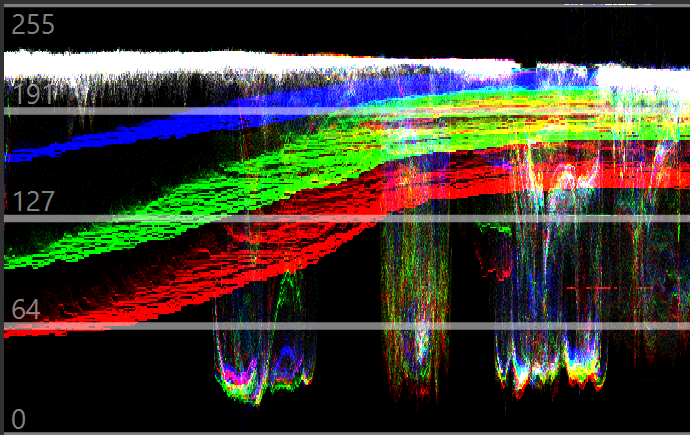
A LUT added as a track filter:
The same LUT added as a clip property, track LUT off ‒ very different waveform, noticeable banding:
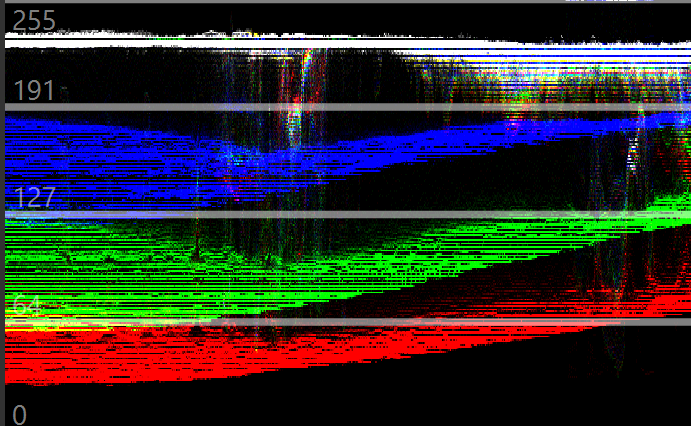
10-bit linear mode, 2020 color space.
1 Like
Good test. What are the properties of your clip?
They should be different, the clip property LUT is applied before conversion to linear (on gamma or log). The filter is applied on linear.
1 Like
What are the properties of your clip?
Format                                   : HEVC
Format/Info                              : High Efficiency Video Coding
Format profile                           : Main 10@L6@Main
Codec ID                                 : hvc1
Codec ID/Info                            : High Efficiency Video Coding
Duration                                 : 3 min 35 s
Bit rate                                 : 34.1 Mb/s
Width                                    : 3 840 pixels
Height                                   : 2 160 pixels
Display aspect ratio                     : 16:9
Frame rate mode                          : Constant
Frame rate                               : 25.000 FPS
Color space                              : YUV
Chroma subsampling                       : 4:2:0
Bit depth                                : 10 bits
Bits/(Pixel*Frame)                       : 0.164
Stream size                              : 876 MiB (99%)
Title                                    : GoPro H.265
Writing library                          : GoPro H.265 encoder
Language                                 : English
Color range                              : Full
Color primaries                          : BT.709
Transfer characteristics                 : BT.709
Matrix coefficients                      : BT.709
Codec configuration box                  : hvcC
Yes sure. But the banding? Couldn’t it mean that the scopes can’t work with 10-bit sources properly, hence instrumental control impossible, just visual?