The Opacity filter controls the alpha (transparency) level of a video or image clip. It modifies how strongly the clip contributes to the final composite.
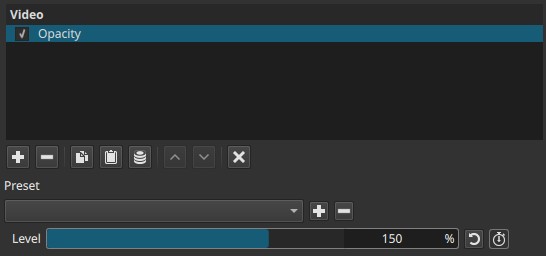
This filter affects only transparency, not color values.
Parameter
Level (0–200%)
Controls the opacity multiplier applied to the clip’s alpha channel.
-
0% Fully transparent (invisible)
-
100% Original opacity (no change)
-
Above 100% (up to 200%) Amplifies the alpha channel
Partially transparent pixels become more opaque
Internally, this parameter applies a gain to the alpha channel, not a clamp limited to 100%.
Keyframes:
The Level parameter can be keyframed to animate opacity changes over time.
This enables fades, dissolves, and animated transparency effects.
Why the range goes to 200%
Opacity values above 100% support compositing workflows where media already contains partial transparency.
This includes:
- Images or animations with alpha channels
- Clips affected by prior filters or blending modes
- Overlays, titles, or graphics with softened edges
Increasing opacity above 100% allows:
- Reinforcing transparency that was reduced earlier in the filter chain
- Restoring visual dominance without reordering filters
- Fine control over layered compositions
Final output opacity is still clamped at fully opaque.
PNG and animated WebP transparency behavior
Formats such as PNG and animated WebP store RGB color data even for fully transparent pixels.
Although these pixels are invisible when alpha is 0 (at 100% on the slider), their color values still exist in the file and can influence compositing when:
- Opacity is increased
- Blending modes are applied
- Alpha is amplified above 100%
As a result, increasing opacity can make semi-transparent areas and their underlying color data more visible, which explains why opacity amplification is meaningful for these formats.
Transparency behavior by format
| Format | Alpha support | RGB data under full transparency |
|---|---|---|
| PNG | Yes | Yes |
| WebP / Animated WebP | Yes | Yes |
| GIF | 1-bit transparency | No (palette-based) |
| Video with alpha (e.g. ProRes 4444) | Yes | Yes |
Visual characteristics
-
Below 100%: increasing transparency
-
At 100%: unchanged appearance
-
Above 100%:
- Semi-transparent areas become more solid
- Overlays and edges appear stronger
- No change to color values, only alpha
Recommended use cases
- Fades and dissolve control
- Strengthening overlays, titles, or graphics
- Correcting reduced opacity after blending or compositing
- Adjusting transparency without changing clip order
Limitations
- Does not affect color, brightness, or saturation
- Fully opaque pixels remain unchanged; opacity amplification affects only pixels with partial transparency.
- Effect depends on existing alpha information
- Hidden RGB data may become visible when opacity is amplified