Subtitles -> Speech to Text not working

I’m running Shotcut 25.10.31 on a Mac running Sequoia 15.6.1. I’m following the instructions given here: Subtitles > Speech To Text but either no text is generated, or it’s something wildly inaccurate. I’ve tried several different language models but nothing has worked. I’ve also tried reinstalling Shotcut.

Here’s the end of the log from my latest attempt:

main: processing ‘/private/var/folders/w2/jtg42mwx3c7bs80dm1vnvdrr0000gn/T/shotcut-hJohme.wav’ (255360 samples, 16.0 sec), 15 threads, 1 processors, 5 beams + best of 5, lang = en, task = transcribe, timestamps = 1 …

[00:00:00.000 → 00:00:15.950] this is a. this is a. this is a. to. to.

[00:00:15.950 → 00:00:30.000] a.

whisper_print_progress_callback: progress = 188%

output_srt: saving output to ‘/private/var/folders/w2/jtg42mwx3c7bs80dm1vnvdrr0000gn/T/shotcut-bQoVFY.srt’

whisper_print_timings: load time = 412.48 ms

whisper_print_timings: fallbacks = 1 p / 1 h

whisper_print_timings: mel time = 8.28 ms

whisper_print_timings: sample time = 97.07 ms / 199 runs ( 0.49 ms per run)

whisper_print_timings: encode time = 118950.10 ms / 1 runs ( 118950.10 ms per run)

whisper_print_timings: decode time = 8073.94 ms / 52 runs ( 155.27 ms per run)

whisper_print_timings: batchd time = 14528.77 ms / 139 runs ( 104.52 ms per run)

whisper_print_timings: prompt time = 0.00 ms / 1 runs ( 0.00 ms per run)

whisper_print_timings: total time = 142146.61 ms

ggml_metal_free: deallocating

Completed successfully in 00:02:22
Then, it is simply not intelligent enough to understand your audio. If your timeline audio includes music and other videos that create noise you should mute some tracks before running this. Try another audio that is clean and in English (since that is what you used given your output). This uses the tool Whisper, and you search the web about other’s experiences with it to get more data.

Thank you for your response.
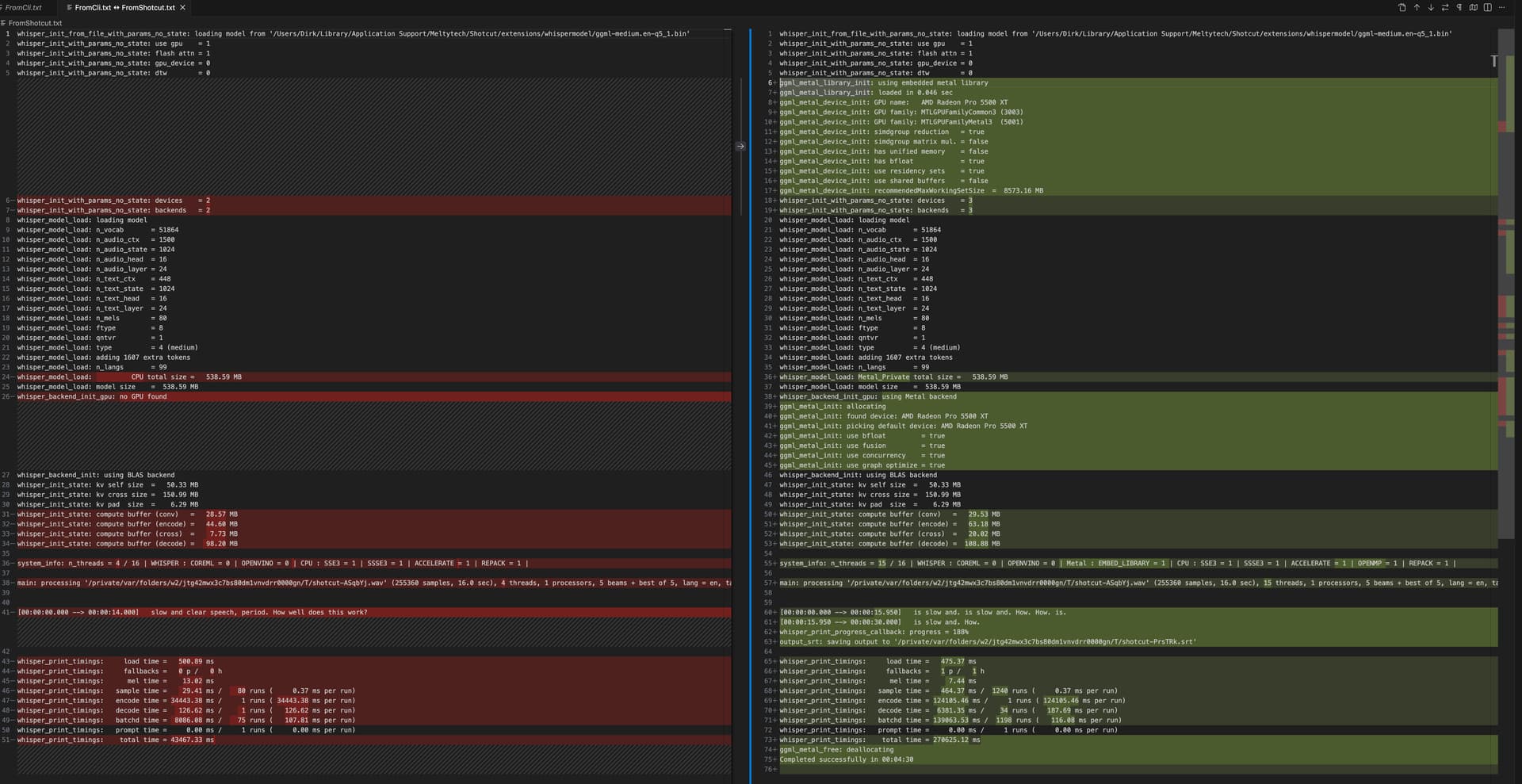
Using Homebrew, I installed whisper-cpp and ran it against the same wav file that I used in Shotcut. A correct transcript of the speech within the file is: “is slow and clear speech, period. How well does this work?” The results were not perfect, but better than the results of running Whisper from within Shotcut. I did a diff on the 2 log files, shown below. Whisper outside of Shotcut is to the left, and within Shotcut is to the right.
As shown, the results from running Whisper standalone were: “slow and clear speech, period. How well does this work?”

The results from running Whisper within Shotcut were: “is slow and. is slow and. How. How. is. is slow and. How.”

It may be helpful to know that the processor on my Mac is a 3.8 GHz 8-Core Intel Core i7.

I see it is using Metal, but maybe that does not work good or work good on non-Apple Silicon. You can run Shotcut’s whisper directly like /Applications/Shotcut.app/Contents/MacOS/whisper-cli with different args to see if you get a better response. What different options? Well, I am not sure; I am not a whisper expert. Upon reviewing them and based on a Web search it seems it may not be possible without a recompile!

I just made a quick test on my M1 with part of an episode of The King of Queens, and it did a great job.

Can you configure Shotcut to use the homebrew whisper and test it within Shotcut?

Update: I just tested it on my Intel Mac, and it was horribly slow and wrong as you experienced. We have optimized for Apple Silicon, and that is unlikely to be changed.

I configured Shotcut to use the Homebrew Whisper.cpp, as you suggested, and it worked. Here are the steps I followed, from the beginning:

  1. Using Homebrew, install Whisper.cpp by using the command “brew install whisper-cpp”
  2. For me, this installed Whisper.cpp in a hidden directory: /usr/local/Cellar/whisper-cpp/
  3. When it’s time to generate subtitles, in the Speech To Text dialog box, click on the Configuration button, then on the folder button following the “Whisper.cpp executable” field
  4. In the Open dialog, navigate to the folder containing the whisper-cli executable and click on the executable. In my case, because the executable was in a hidden directory, I could not navigate to it in the conventional way, so, with the Open dialog open, I used CMD + shift + G to open a window into which I could paste the path to the executable. In my case, this path is “/usr/local/Cellar/whisper-cpp/1.8.2/libexec/bin/whisper-cli”
  5. Finish the process as normal and it should work.

It appears that the problem is that the Whisper.cpp that comes with Shotcut is optimized for Apple Silicon, and does not work on Macs with Intel processors. The process described above installs a version of Whisper.cpp that works with Intel, and then tells Shotcut to use it.

1 Like