Selects the algorithm used to convert interlaced video to progressive for display in the Shotcut player.
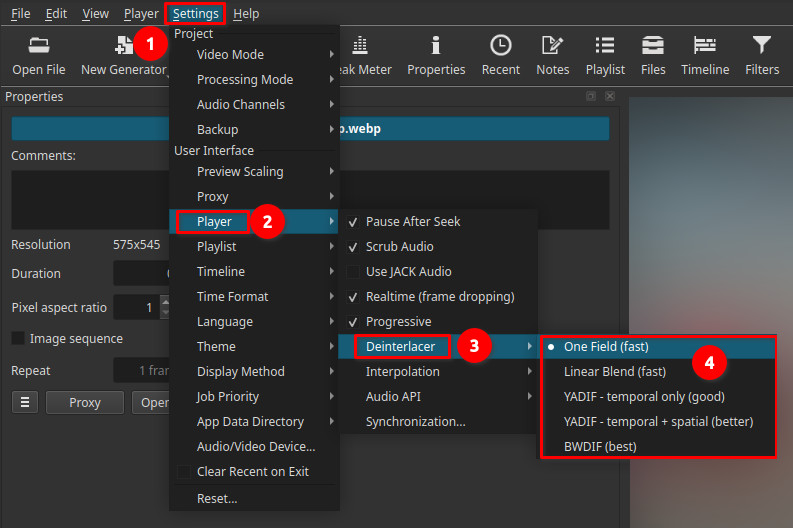
This setting affects preview quality and performance only.
It does not modify clips, timeline data, or export output.
Historical context
Interlacing originated in early analog television systems as a way to reduce bandwidth usage while maintaining acceptable motion smoothness on cathode-ray tube (CRT) displays. By transmitting alternating fields instead of full frames, broadcasters could double the perceived refresh rate without increasing signal bandwidth.
As display technology evolved, flat-panel screens (LCD, LED, OLED) became standard. These displays are inherently progressive and cannot show interlaced fields directly. As a result, interlaced video must be converted into progressive frames for proper viewing.
Deinterlacing exists to bridge this gap between legacy interlaced formats (such as PAL, SECAM, NTSC, and 1080i broadcast video) and modern progressive displays.
What Deinterlacing is
Interlaced video stores each frame as two fields captured at different times.
Deinterlacing reconstructs those fields into a single progressive frame suitable for modern displays.
Different deinterlacing methods trade quality, motion accuracy, and performance.
Scope and behavior
- Applies to player preview
- Option is always selectable, regardless of the Progressive setting
- Has no effect on exports
- Does not alter source media
The selected method defines how interlaced content is processed when displayed.
Deinterlacer options
One Field (fast)
This is the default. It uses only one field to build each frame.
- Very fast
- Half vertical resolution
- No motion blending
Visual result
- Stable motion
- Softer image
- Reduced detail
Use when: performance is critical or hardware is limited.
Linear Blend (fast)
Blends the two fields together into one frame.
- Fast processing
- Simple averaging
Visual result
- Reduced combing
- Motion blur on movement
- Loss of sharpness
Use when: quick preview with fewer visible artifacts is acceptable.
YADIF temporal only (good)
Motion-adaptive deinterlacing using temporal information (differences between frames).
- Preserves more detail
- Balanced quality and performance
Visual result
- Cleaner motion
- Fewer artifacts than blending
Use when: regularly previewing interlaced footage.
YADIF temporal + spatial (better)
Uses both temporal and spatial analysis.
- Improved edge reconstruction
- Higher processing cost
Visual result
- Sharper edges
- Cleaner motion
Use when: preview quality is more important than performance.
BWDIF (best)
Advanced deinterlacing algorithm designed for high-quality reconstruction.
- Best motion handling
- Highest detail preservation
- Most computationally expensive
Visual result
- Smooth motion
- Minimal artifacts
Use when: inspecting interlaced footage carefully, archival work, or quality-critical review.
Performance considerations
| Method | Quality | Performance |
|---|---|---|
| One Field | Low | Very fast |
| Linear Blend | Low–Medium | Fast |
| YADIF (temporal) | Medium | Moderate |
| YADIF (temporal + spatial) | High | Slower |
| BWDIF | Highest | Slowest |
Limitations
- Preview-only setting
- Does not replace export deinterlacing
- Higher-quality methods may reduce playback performance
- No effect on progressive sources