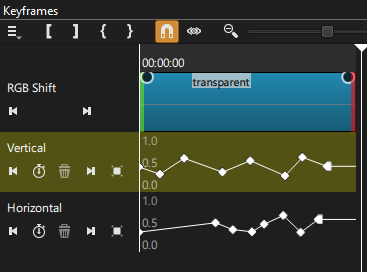
Made a transparent color clip to put text on so I could add filters to just the text instead of the background black underneath it. Tried to use RGB SHIFT, and as soon as I move or edit the vertical amount, Shotcut immediately crashes. I repeatedly tested it in different orders and disabling the other filters, and it’s still always that one vertical RGB slider that triggers it. Inputting a number in the box does the same thing. The only things on the timeline at all were the transparent color with the text, a black color underneath, and a soundtrack mp3. I never made it far enough to add anything else.
Stayed on version 25.12 because the v26 updates were too unstable on my PC for some reason, but I digress.
Any ideas are appreciated. Anyone else had this issue?
PC Specs:
Shotcut 25.12, Windows 10 Home
Intel i5-9400F, RTX3060, 64gb DDR4