Simulates the way sound reflects and decays in a physical space, adding a sense of depth, distance, and environment.
Reverb recreates both the early reflections (first bounces off nearby surfaces) and the reverb tail (the longer decay that follows).
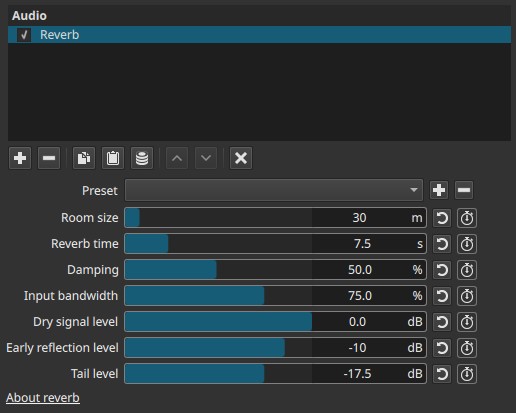
Reverb is a time-based spatial effect. All parameters are keyframeable, allowing the perceived space to change over time.
Parameters
Room size (1 - 300 m)
Defines the virtual size of the space in which the sound exists.
-
Small values (≈1 - 10 m)
Very small rooms; tight, close reflections. -
Medium values (≈10 - 50 m)
Typical indoor spaces such as rooms or halls. -
Large values (>50 m)
Large halls or cavernous spaces.
Note:
Larger room size = reflections feel farther away and more spacious.
Reverb time (0.1 - 30.0 s)
Controls how long the reverb takes to decay after the sound stops.
-
Short times (≈0.1 - 0.5 s)
Subtle ambience; barely noticeable. -
Medium times (≈0.8 - 3 s)
Natural room or hall reverberation. -
Long times (>5 s)
Large, echoing spaces; dramatic or stylized effects.
Important distinction:
Room size affects space perception; reverb time affects decay duration. They are related but not the same.
Damping (0.0 - 100.0%)
Controls how quickly high frequencies decay in the reverb tail.
-
Low values
Bright, metallic reverb; highs persist. -
High values
Darker, warmer reverb; highs fade faster.
Examples:
Higher damping is often preferred for dialogue to avoid harshness.
Input bandwidth (0.0 - 100.0%)
Limits how much of the incoming frequency range is fed into the reverb.
-
Low values
Narrower frequency range; darker reverb. -
High values
Full-range reverb input.
Note:
This controls how “full” or “thin” the reverb sounds.
Dry signal level (-70.0 to 0.0 dB)
Sets the level of the original, unprocessed sound.
-
0.0 dB
Original signal at full level. -
Lower values
Original signal reduced, making reverb more prominent.
Early reflection level (-70.0 to 0.0 dB)
Controls the level of early reflections.
- Early reflections define perceived room size and distance
- Too much can make sound feel close but boxy
- Too little can reduce realism
Examples:
Helpful for placing voices slightly “into” a room without heavy tail.
Tail level (-70.0 to 0.0 dB)
Controls the level of the reverb tail (late reflections).
- Higher values increase ambience and spaciousness
- Lower values keep sound clearer and closer
Behavior note:
The tail is where long decay and “wash” come from.
Keyframes
All reverb parameters are keyframeable.
This allows:
- Gradually moving a sound into or out of a space
- Increasing reverb for transitions or flashbacks
- Changing perceived room size within a clip
Reverb changes are best evaluated during playback.
Auditory characteristics
- Adds depth and spatial context
- Makes sounds feel closer or farther away
- Excessive reverb reduces clarity
- Long tails can mask speech and detail
Recommended use cases
- Adding natural ambience to dialogue
- Placing sounds in a believable environment
- Enhancing music or ambient soundscapes
- Creating distance or memory/flashback effects
- Stylized or dramatic spatial effects
Example settings
-
Subtle dialogue ambience
- Room size: 10 - 20 m
- Reverb time: 0.5 - 1.2 s
- Damping: 60 - 80%
- Early reflections: -12 to -18 dB
- Tail level: -20 to -30 dB
-
Large hall / dramatic space
- Room size: 50 - 100 m
- Reverb time: 4 - 8 s
- Damping: 30 - 50%
- Tail level: -10 to -15 dB
-
Distant or dreamlike sound
- Dry signal level: reduced
- Tail level: increased
- Long reverb time
Usage notes and tips
- Start with small amounts; reverb builds quickly.
- For dialogue, keep the dry signal dominant.
- Adjust early reflections before increasing tail level.
- Too much reverb can sound muddy or unnatural.
Limitations
- Not a physical room simulator
- No per-surface control
- Can reduce intelligibility if overused
- Extreme settings may cause ringing or wash