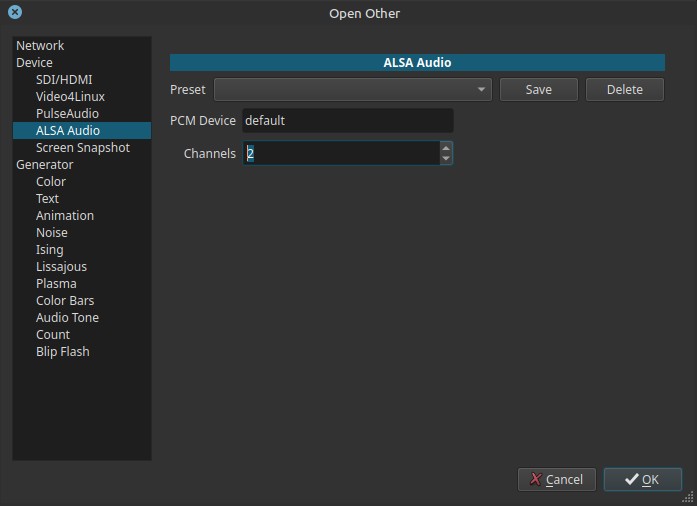
Opens a raw audio capture device using ALSA (Advanced Linux Sound Architecture).
This allows Shotcut to capture audio directly from an ALSA PCM device instead of importing an audio file.
This feature is Linux-specific and intended for advanced or low-level audio capture.
What ALSA is
ALSA is the low-level audio subsystem of the Linux kernel.
It provides direct access to sound hardware through PCM (Pulse Code Modulation) devices.
Unlike PulseAudio (or PipeWire), ALSA:
- Operates closer to the hardware
- Provides minimal abstraction
- Does not handle mixing, routing, or device management automatically
Shotcut accesses ALSA through FFmpeg.
Important context
On Linux, Timeline > Record Audio uses PulseAudio (or PipeWire), not ALSA. Microphone selection and routing are expected to be configured at the desktop/system level. Shotcut does not provide internal ALSA or PulseAudio configuration panels.
Controls
PCM Device (input)
Specifies the ALSA PCM device name to open.
- Default value:
default - This refers to the system’s default ALSA capture device
Advanced users may enter explicit ALSA device identifiers, such as:
hw:0,0plughw:1,0
If an invalid or unsupported device is specified, capture will fail.
Channels (0 - 8)
Specifies the number of audio channels to capture.
1— Mono2— Stereo (default)- Higher values — Multi-channel capture (if supported by the device)
The device must support the requested channel count.
Scope and behavior
- Linux-only feature
- Captures audio only
- Appears as a live source
- No internal level controls
- No automatic device selection
This capture path bypasses desktop audio routing.
Typical use cases
-
Capturing audio from:
- USB audio interfaces
- Professional sound cards
- External mixers
-
Low-latency or direct hardware access
-
Advanced workflows where PulseAudio/PipeWire is not setup
-
Technical testing or diagnostics
Usage notes and warnings
- ALSA device names are system-dependent
- Incorrect PCM device strings will cause silent failure
- No automatic resampling or mixing is provided
Relationship to PulseAudio / PipeWire
- PulseAudio (or PipeWire) sits on top of ALSA
- Timeline > Record Audio uses PulseAudio
- ALSA device capture is a direct, bypass path
If recording fails via ALSA, a common workaround is to:
- Close any other process using ALSA because often the device cannot be used by more than one process, which is a big reason why PulseAudio, PipeWire, and JACK exists.
- Record audio using a dedicated ALSA-capable application
- Import the resulting audio file into Shotcut
Limitations
- No device discovery UI
- No level meters
- No internal routing or mixing
- Requires ALSA knowledge
- Behavior depends on kernel driver and hardware support