Feature Request: Advanced Text Animation & 3D Text Support

Dear Shotcut Development Team,

I hope this message finds you well. First of all, I want to express my sincere appreciation for creating such an incredible video editing tool. Shotcut has become my go-to editor because of its clean, intuitive interface and lightweight performance on Linux.

However, I would like to humbly request some advanced features that I believe would make Shotcut even more powerful:

1. Advanced Text Animation

  • Per-character animation (typewriter effect, stagger, bounce)

  • Text on path (curve/path following text)

  • Character-level keyframes for position, scale, opacity, and rotation

  • Preset text animations (fade in/out, slide, zoom, etc.)

2. 3D Text Support

  • Basic 3D extrusion for text layers

  • Bevel, depth, and lighting controls

  • 3D rotation keyframes (X, Y, Z axis)

3. Enhanced Keyframe System

  • Graph editor for custom easing curves

  • Copy/paste keyframes between clips

  • Keyframe presets and saveable templates

  • Motion blur for animated elements

Why This Matters

Many users (including myself) love Shotcut’s simplicity but have to switch to Blender or DaVinci Resolve just for text animation. Adding these features would eliminate that need and keep users within Shotcut’s clean ecosystem.

I understand development takes time and resources. I am willing to donate, test beta builds, or help spread the word to support this.

Thank you for your hard work and dedication to open-source software!

Best regards,
CachyOS Linux User
1 Like

Per-character animation (typewriter effect, stagger, bounce)

There is already a typewriter text, but I guess that can be expanded.

Text on path

That is in Glaxnimate and not going to try to dump all of its UI into Shotcut. I looked into it, and it results in a cluttered mess of panels. I might add a new template to the new Elements > Text. However, I think this requires converting the text object into a shape inside Glaxnimate, which makes the text uneditable.

Preset text animations

There are already animation presets in Text: Simple, Text: Rich, and Size Position & Rotate. Maybe there needs to be more or maybe they can be surfaced higher and show an example. But also, Filters and Keyframes offer simple keyframes animation that it seems most people overlook (judging from YouTube instruction/example videos). However, we need to add keyframe easing types into this somehow.

3D Text Support

See Generate > Image/Video from HTML. I am going to add another based on COLRv1 font tech. Color and variable fonts have some parameters, but Shotcut’s UI is too limited in this regard without editing HTML code ala https://codepen.io/scottkellum/pen/ExLNjzj

It’s possible some day to create something with Qt Quick. But more than likely people can use another tool possibly with AI to assist. OpenShot’s blender integration is neat, but what if you want to do something more custom and do not know Blender? Be prepared to study for days or weeks or setup AI assistance.

Graph editor for custom easing curves

Heh, I doubt many people do not use the existing numerous keyframe types let alone custom curves. The engine does not yet have this.

  • Copy/paste keyframes between clips
  • Motion blur for animated elements

These are already on the road map but low priority. Multi-select operations for keyframes is higher.

have to switch to Blender or DaVinci Resolve just for text animation

Really? Those are powerful but not easy at all. We have Glaxnimate integration, several text filters and generators that can be keyframed and combined with other filters. Also, Generate > Image/Video from HTML as well as the new Elements. Subtitles with its burn-in filter and generate text features. You can even animate each generated text using Size Position & Rotate, copy it, and apply it quickly to all the others (select them, right-click, Apply Copied Filters). Not everything needs to be inside Shotcut. What are you really asking for, a powerful motion graphics tool? More than Glaxnimate? Have you seen Friction?

https://www.youtube.com/results?search_query=friction+software

See also ColrStudio for Text / Titles I recently posted.

1 Like

Hi @kazmi ,
This would be a good time to introduce a brand new free online animated text application that works in conjunction with Shotcut. The app is not quite available yet (it’s still in development and being tested) but will hopefully be “launched” in about a month’s time (maybe slightly earlier).

It’s called “Anitype”, and has actually in the process of development by myself and three other collaborators, @musicalbox, @namna and @SergeC (all avid Shotcut users and regular posters on this forum over many years).

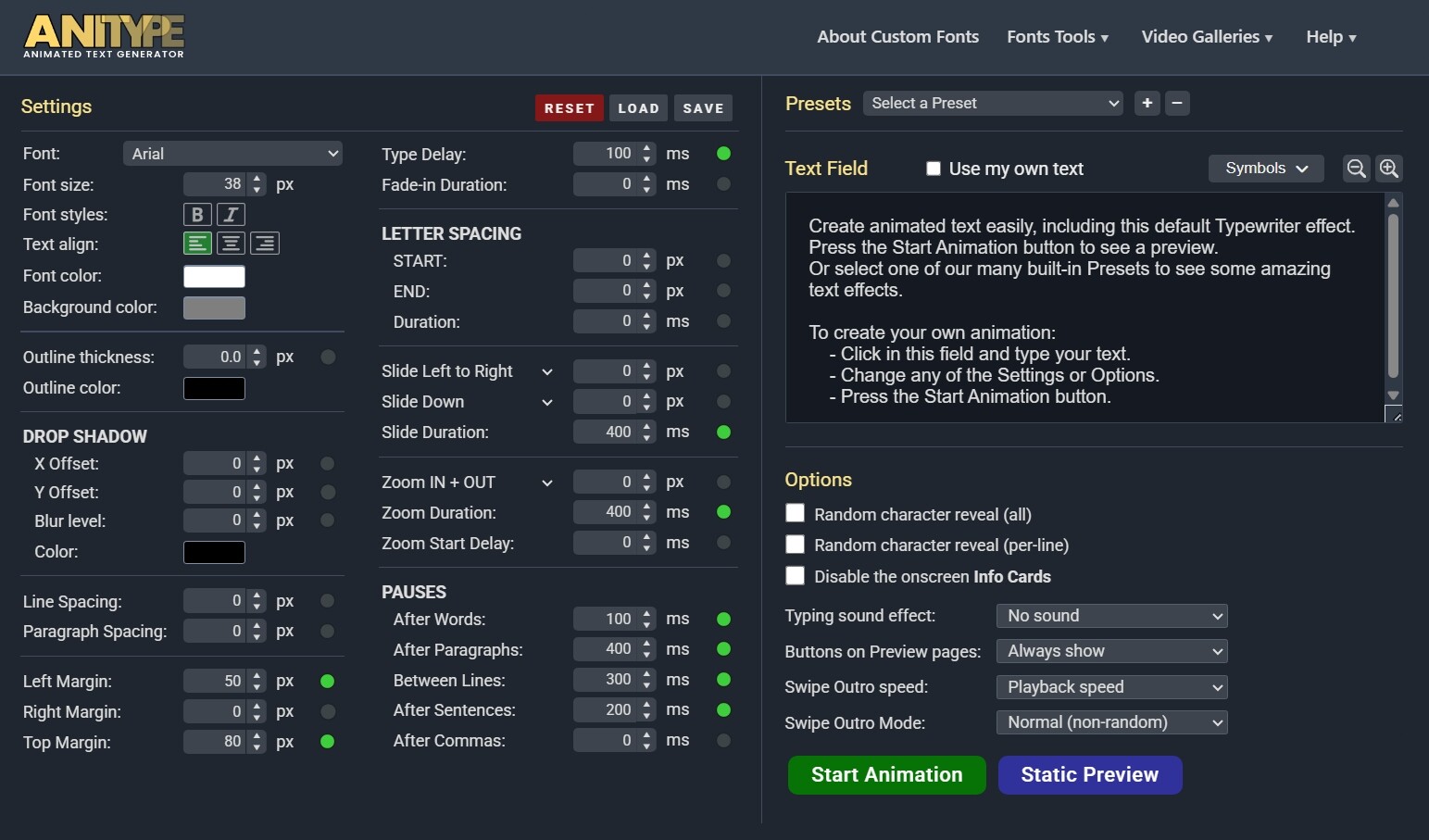
We’ll be giving out full details when we launch it, but it is crammed with features making it possible to create animated text in a wide variety of styles, with over 50 presets and many user-customizable parameters - including speed of typing, slide/zoom effects, font, outline, colors, spacing, pauses and more… Here’s a screenshot of the main settings page (BETA version):

You can also add sounds, add outros, or make the characters appear randomly…

It also offers an interesting feature that lets you use ANY Google font! (1,951 Google fonts are available).. directly within the app, without having to download any of them.

Apologies for not being able to offer this app just yet, but we need to complete some final testing before its release.

In the meantime, here is a short demo showing just a few examples of text animations it can create:

2 Likes