Applies a simple three-band equalizer designed for quick tonal adjustments.
Unlike multi-band equalizers, this filter focuses on broad frequency regions, making it suitable for fast, intuitive correction rather than detailed shaping.
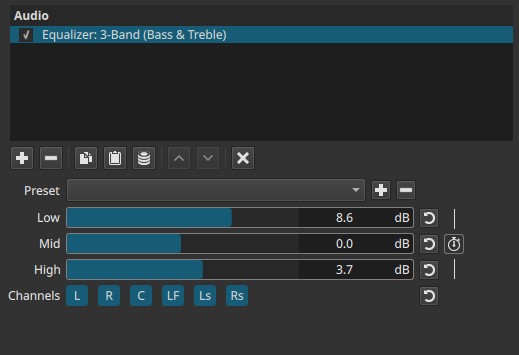
This filter operates in the frequency domain. All three controls are keyframeable as a group, not individually.
Parameters
Low (Bass)
Controls low-frequency content.
- Adds or removes bass weight
- Too much boost can sound boomy or muddy
- Cutting reduces rumble and low-end clutter
Examples: bass guitar, kick drum, low warmth in voices
Mid
Controls the midrange, where most speech and musical detail lives.
- Boosting improves clarity and presence
- Excessive boost can sound nasal or harsh
- Cutting can make audio sound distant or hollow
Examples: dialogue intelligibility, body of instruments
High (Treble)
Controls high-frequency content.
- Boosting adds brightness and air
- Too much boost causes hiss or sibilance
- Cutting softens sharp or brittle sounds
Examples: consonants in speech, cymbals, high detail
Keyframes (grouped)
All three sliders are keyframed together.
- Individual bands cannot be animated independently
- Each keyframe stores the full three-band EQ state
This enables gradual tonal shifts over time, such as moving from muffled to clear audio.
Channel selection (toggle buttons)
Determines which audio channels the equalizer is applied to.
Buttons are toggle switches and are not keyframeable.

Available buttons depend on the project’s audio channel configuration: Settings > Audio Channels
- L — Front Left
- R — Front Right
- C — Center
- LF — Low-Frequency Effects (LFE)
- Ls — Surround Left
- Rs — Surround Right
Important note:
Independent equalization per channel requires adding separate instances of the filter.
Auditory characteristics
- Broad tonal changes rather than precise adjustments
- Boosting Low and High together can create a “smile” curve
- Excessive boosts may introduce resonance or listener fatigue
- Cuts are often more natural than large boosts
Recommended use cases
- Quick tonal correction
- Improving dialogue clarity
- Adding warmth or brightness
- Matching tonal balance between clips
- Simple adjustments in multi-channel projects
Usage notes and tips
-
Start with small changes (±2 - 3 dB).
-
For dialogue:
- Slightly reduce Low to remove rumble
- Gently boost Mid for clarity
-
For music:
- Adjust Low for weight
- Use High for brightness and air
-
If audio becomes harsh, reduce High before adjusting Mid.
Limitations
- No precise frequency control
- No Q (bandwidth) adjustment
- Grouped keyframes only