Applies a non-uniform, position-dependent scaling to the image.
Instead of scaling the entire frame evenly, this filter stretches or compresses different regions by varying amounts, producing bending or “elastic” deformation effects.
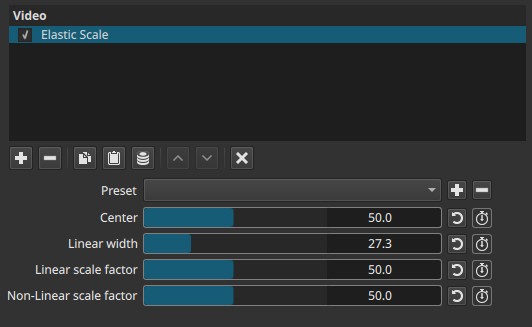
Elastic Scale is a geometric distortion filter, not a crop or zoom tool.
What “elastic” means here
In a normal scale:
- Every pixel moves proportionally
- Shapes remain straight
In elastic scaling:
- Some areas scale more than others
- Straight lines can bend
- The image appears stretched, squeezed, or curved around a center
Note:
Elastic Scale redistributes space across the image instead of resizing it uniformly.
Parameters
Center (0.0 - 100.0)
Defines the horizontal center point of the elastic effect.
-
50.0
Effect is centered in the frame. -
Lower values
Effect is biased toward the left. -
Higher values
Effect is biased toward the right.
This control determines where the deformation pivots, not how strong it is.
Linear width (0.0 - 100.0)
Defines the width of the linear (uniformly scaled) region around the center.
-
0.0
No linear region exists. -
Higher values
A wider central zone is scaled evenly, with elastic deformation occurring outside it.
Important behavior
- When Linear width = 0.0, the Linear scale factor has no effect.
Note:
Linear width defines how much of the image behaves “normally.”
Linear scale factor (0.0 - 100.0)
Controls the uniform scaling applied inside the linear region.
-
50.0
Neutral scaling for the linear region. -
Lower or higher values
Compress or expand the central region evenly.
Important behavior
- Has no effect unless Linear width is greater than 0.0.
Non-linear scale factor (0.0 - 100.0)
Controls the strength and direction of elastic deformation outside the linear region.
-
50.0
Neutral state; no elastic distortion. -
Lower values (<50)
Image bends outward, producing a bulging or fisheye-like effect on one side. -
Higher values (>50)
Image bends inward, compressing space and creating a pinched or curved look.
This control affects how space is redistributed, not just how large areas appear.
Note:
Non-linear scale factor controls curvature, not size.
Keyframes
All parameters are keyframeable.
This enables:
- Animated warping effects
- Progressive bending or straightening
- Motion-driven distortion synchronized with action or music
Parameter interaction (important)
- Center defines where the deformation is anchored.
- Linear width defines how much of the image is unaffected by elastic bending.
- Linear scale factor affects only the linear region.
- Non-linear scale factor controls the elastic distortion outside that region.
If:
- Linear width = 0.0
→ Linear scale factor is ignored
→ Non-linear scale factor alone drives the effect
Visual characteristics
- Horizontal bending or squeezing
- Curved vertical lines
- Asymmetric distortion if Center is offset
- No change to color or luminance
The effect is purely geometric.
Recommended use cases
- Stylized distortion or surreal effects
- Simulating lens-like warping without true optics
- Transitional effects between shots
- Emphasizing or de-emphasizing regions without cropping
Limitations
- Distortion is horizontal only
- Can easily produce unnatural geometry
- Not suitable for corrective scaling
- No edge feathering or protection zones