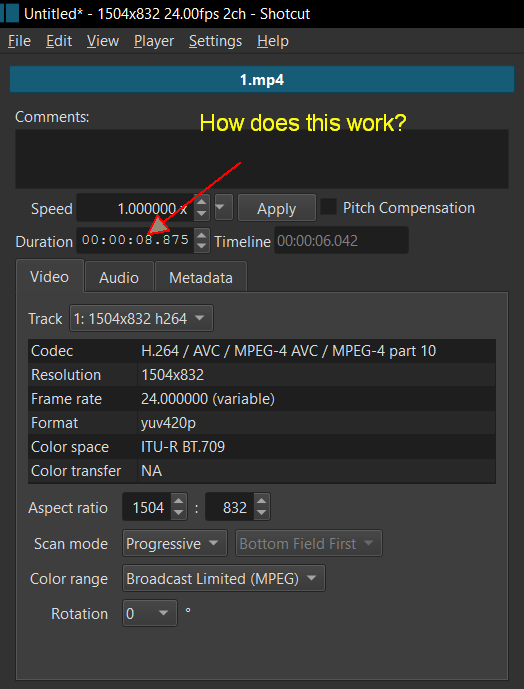
It would be really nice if we could get a granular control on shortening or extending the length of the clips with this kinda controls.
That is in the playlist, if I am understanding correctly. But the items in the playlist do not equate to what is in the timeline. Once you place a clip on the timeline, you can shorten it to whatever length you want, subject to the limitations of the video properties of the project. (Example: if you are using 30fps, you can only change the length in units of 1/30 of a second - 1 frame.)
Timeline Duration only shows you the information.
You can have more precision when trimming in the timeline by using the I or O shortcuts to shorten the clip.
To make it longer is a bit trickier because it depends on whether there is blank space before or after the clip and whether ripple mode is on. That is one reason why Duration is not editable. If ripple is not on and there is not enough blank space, should it only extend to fill the blank space and not completely honor the request (can be considered a bug)? Or should it overwrite some of the neighboring clip or make a transition? So, for now, you decide by interactive dragging. Pay attention to the popup bubble that shows how much you are adding. Zoom in the timeline if you need more precision.
2 Likes
One thing I sometimes use the Duration field for is to add extra space on a short audio clip to apply an echo (Delay filter) or reverberation (Reverb filter).
If there is no empty space at the end of the audio clip, the reverberation will be cut off before it has time to end.
Here’s an example:
2 Likes
Sorry, before I answered about Timeline Duration. What your arrow points to is the source duration. Changing the duration of the source does not affect ending time of a timeline clip (Timeline Duration). See my previous answer.
@MusicalBox shows one good use case. However, this is a general purpose override similar to Aspect ratio, Scan mode, and Color range. What if the file’s attributes or Shotcut’s detection is wrong? You want to override it.
There is another very common use case: slowing down videos using a Time/Speed filter. If you slow down the video or audio using a time filter then it naturally extends the duration of the media, but filters are not able to alter the duration of a file. You need to manually override it here.
2 Likes
As always, what a brilliant explanation - thank you so much.
1 Like
This topic was automatically closed after 90 days. New replies are no longer allowed.