Ertan
November 19, 2026, 3:32pm
1
Hi everyone,
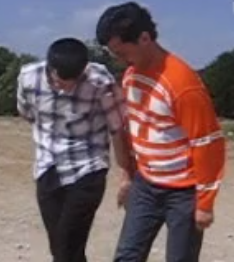
I have a very old 30-second video clip. It’s in .avi format… The resolution is 320x240.
How can I change the color of the orange sweater to gray? Which filters should I use?
Thanks in advance to whoever can help me.
Try this: HSL Range filter
Ertan
November 19, 2026, 5:43pm
3
So, how are we going to use it?
shotcut
November 19, 2026, 6:17pm
4
The HSL Range Video Filter was added in Shotcut 25.01.03
The HSL Primaries Video Filter operates in the HSL color model. It can adjust the Hue, Saturation and Lightness of the colors in a specified color range. The hue can be shifted +/- 180 degrees. The saturation and lightness can be scaled by a configurable factor.
The blend parameter controls how much an adjustment can fade into the adjacent color colors outside the range. This can be helpful to avoid banding when the image has a gradient …
It is a little like doing a chroma key:
Use the color picker to select the orange. Click and drag a small rectangle so you get a nice average color instead of a single pixel that might be a stray value.
set Saturation Scale to 0
Expand Hue Range a little as needed