With a transition object selected, open the Properties panel (Ctrl+2) to change how the transition looks:
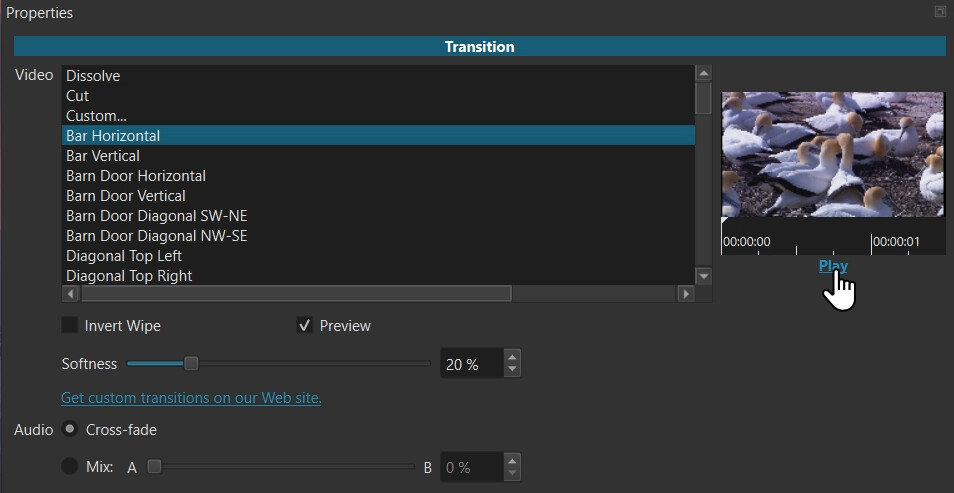
Parameters
Video
A dropdown menu containing various transition types (Dissolve, Horizontal/Vertical Wipe, Iris, Barn Door, etc.). Dissolve is the default. The others are kinds of wipe. A wipe is an effect that does not distort the clips at all; they only change how one blends with the other using some shape or pattern.
Choose Cut to not do any effect. This is useful to have and audio cross-fade with a hard change from clip A to clip B. Choosing this changes the slider to Position to control when the cut occurs.
Custom opens a whole new world of wipe patterns. See Creating a Custom Video Wipe and a large supply of community-made ones in the Transitions section on the Shotcut - Resources Web page. Choosing this opens a file dialog and you pick a file that you downloaded or made. To save a custom file you have selected to the list of wipes for convenient, future use: click the star button to add it as a favorite.
Invert Wipe
Reverses the direction of the wipe or animation.
Softness
Adjusts the blurriness of the edge for wipe transitions.
Audio
Choose between Cross-fade (the default: smoothly mixing the sound over time) or Mix (adding the audio levels together).
Video Preview
The embedded viewer provides a quick preview of the wipe without having to play it in the main player. It starts automatically when you choose a wipe. You can also seek and scrub the mini player. After the preview has played once click Play to play it again.