Can anyone help me on how to use Lift (Z). Which appears when you select a clip on timeline and go to option. What does that feature really do?
Just found this
Can someone help me and explain in detail.
Can anyone help me on how to use Lift (Z). Which appears when you select a clip on timeline and go to option. What does that feature really do?
Just found this
Can someone help me and explain in detail.
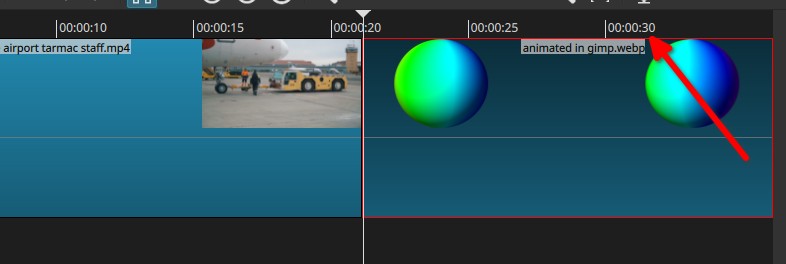
Before to make a transition between 2 clips, they are side by side on a track, the one on the right for example has a certain length…
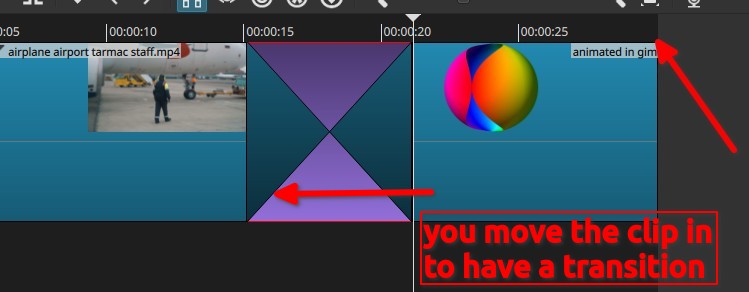
Then you make the transition, by moving the one on the right side to the left side… thus also reducing its length on the timeline (look now the time on the timeline >> no more 30 seconds:
Now you want to cancel this later in your project, because whatever, thus you cannot do a Ctrl+Z because you will remove a lot of work done before changing your mind, thus the options you mentioned:
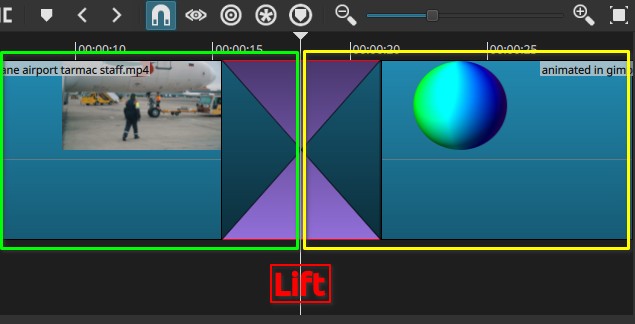
if you use Lift (Z) on the transition, the transition removal space will be share by both clip (green, take half, and yellow take the other half, BUT you did not get back the full length of the clip of the right nor the left
you do not see the 30 seconds on the timeline on the right side of the right clip, there also it did not get back to the full length which is VERY useful if you have a third clip in transition on this right side as well
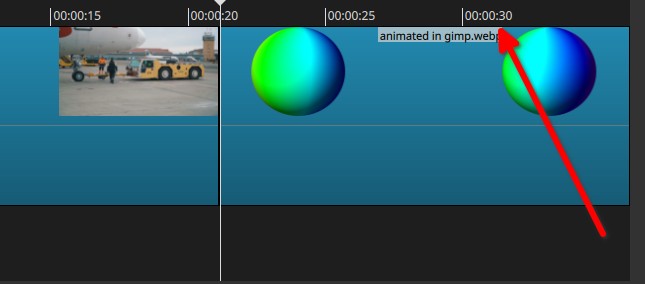
If you use Ripple Delete on the transition you get everything back to their place before making the transition (see the 30 seconds there again and the first clip to its 20 seconds)
Hopefully I explained “properly” in this different way/wording 
For regular clips:
Lift (Z) basically deletes something on the timeline without affecting stuff around it (so it leaves an empty gap instead).
“Ripple delete (X)” also deletes something on the timeline but doesn’t leave any gap behind.
So if you have 3 clips side by side that each are 10 seconds long:
[ clip1 ][ clip2 ][ clip3 ]
If you Lift(Z) clip 2 then the result is:
[ clip1 ][10 seconds empty area][ clip3 ]
But if you Ripple delete(X) clip 2 then the result is:
[ clip1 ][ clip3 ]
This is for regular clips, I see Patrice has explained what this does to transitions as that is a special case.
Now makes perfect sense. Thanks so much. Let me go to try to do it.
Now this also make sense. Which general makes Lift (Z) is good for music purpose because it will keep things still sync after deleting.