Encodes a mono or conventional audio signal into an ambisonic sound field by assigning it a virtual position in 3D space.
Instead of decoding spatial audio for playback, this filter performs the opposite operation: it places a sound source into an ambisonic environment.
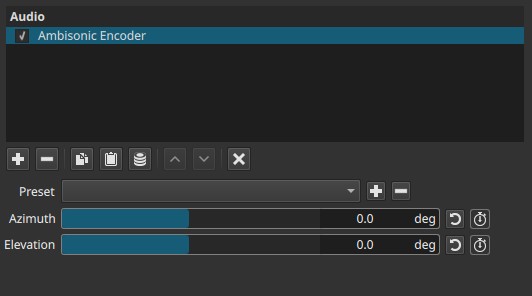
Ambisonic Encoder is a spatial audio generation filter. Its effect is temporal and must be evaluated during playback.
Parameters
Azimuth (-360° to +360°)
Controls the horizontal angle of the virtual sound source around the listener.
-
0°
Sound is positioned directly in front. -
Positive / negative values
Rotate the sound source clockwise or counterclockwise around the listener. -
The full ±360° range allows continuous rotation or looping motion.
Azimuth corresponds to left–right positioning around the listener.
Elevation (-360° to +360°)
Controls the vertical angle of the virtual sound source.
-
0°
Sound is positioned at ear level. -
Positive values
Move the sound source upward. -
Negative values
Move the sound source downward.
Elevation corresponds to up–down positioning.
Keyframes
Both Azimuth and Elevation are keyframeable.
This enables:
- Moving a sound source through space over time
- Circular or spiral motion paths
- Synchronizing sound movement with on-screen action
- Static placement or animated spatial motion
Viewer overlay (position reference)
When the Ambisonic Encoder filter is active, a rectangular overlay appears in the preview player.
- A semi-transparent dot represents the current virtual sound position.
- The horizontal axis corresponds to Azimuth.
- The vertical axis corresponds to Elevation.
Behavior and interaction
-
Moving Azimuth shifts the dot left or right.
-
Moving Elevation shifts the dot up or down.
-
The dot can move outside the rectangle, indicating angles beyond the primary reference range.
-
The dot can also be dragged directly with the mouse in the preview player:
- Horizontal dragging updates Azimuth
- Vertical dragging updates Elevation
- Changes are reflected immediately in the corresponding sliders
Note:
The overlay is a visual and interactive reference only and is not rendered into exports.
What the overlay represents
The rectangle and dot form a visual positioning reference for the encoded sound source:
- It shows directional placement, not distance or loudness.
- It updates in real time as parameters change.
- It is a guide only and is not rendered into exports.
The overlay helps correlate numeric angle values with perceived spatial movement.
Purpose and typical workflow
The Ambisonic Encoder is used to:
- Convert a mono sound into ambisonic space
- Define where a sound exists within a 3D sound field
- Prepare audio for later decoding with Ambisonic Decoder
- Create spatial motion before mixing or rendering
Typical workflow:
- Encode individual sound sources using Ambisonic Encoder
- Animate their positions using keyframes
- Decode the resulting ambisonic mix using Ambisonic Decoder
Auditory characteristics
- Audible changes in perceived sound direction
- No visual output is rendered
- Motion is smooth when keyframes are interpolated
- Perceptual clarity depends on the decoding method used later
Recommended use cases
- Spatial and surround sound design
- 360° or VR audio workflows
- Placing sound effects in a virtual environment
- Animated sound movement
- Preparing sources for Ambisonic mixing
Limitations
- Does not control distance or attenuation
- No control over spread or width
- Requires Ambisonic decoding later to be audible as spatial audio