

The Export panel (also File > Export Video…) is used to create a new video or audio file from your project because File > Save saves a project file. Think of this like a photo editor that saves its own format (e.g. .psd or .xcf) versus saving a JPEG or a word processor that saves to its own format (e.g. .doc or .odt) versus a PDF.
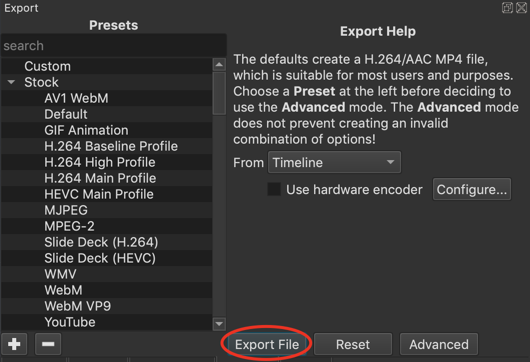
The most important thing to know is to click Export File to export your project as a new video file. It opens the standard save file dialog for your operating system where you must choose a folder and give it a name.
Here are the other things to know about the Export panel in its basic mode:
- Click Advanced to show many more controls and options. However, by clicking Advanced you should understand that Shotcut expects you to be advanced and know what you are doing. There are simply too many combinations of settings and options that Shotcut’s advanced export mode lets you create invalid combinations and does not protect you from yourself.
- The Reset button is used in advanced mode to reset all the options and settings to their default values.
- The list of many things on the side are Presets. There are many presets provided by Shotcut in the Stock category, and you can add your own that will be shown under the Custom category. The + and - buttons at the bottom of the list are used to add and delete custom presets.
NOTE: It is not necessary to choose a preset! Shotcut comes with default values that creates a high quality H.264 MP4 file at a reasonable size and speed that automatically adapts to the resolution, frame rate, and visual complexity of your project. Clicking Reset or the preset named Default restores the panel to its default values. - The From field lets you choose what to export. You can export more than just the timeline. In fact, you do not even need to use the Timeline in Shotcut! Here are the options:
- Timeline: This is the default if you have added anything to the Timeline.
- Current Playlist Bin: Exports the Playlist as a single, sequential file. Since a playlist has optional bins (categories), it depends on which bin is currently chosen. If you are not using bins then it is the entire playlist.
- Each Playlist Bin Item: Exports a separate file for each item in the playlist or, optionally, the current bin if using playlist bins.
- Source: You can export a single clip that has been trimmed and filtered in the Source player.
- Marker…: Exports a range Marker, which is a marker with a duration.
- Use hardware encoder is option to use the hardware-accelerated encoder in your NVIDIA or AMD GPU or CPU (Intel Quick Sync on most processors since 2012, but it may depend on your motherboard as well). You will need to tell Shotcut which you have, but if it has not been configured Shotcut tries to automatically detect it when you click the checkbox to turn it on. Pay attention to the status message area just below the player controls for several seconds after clicking the checkbox to see what it reports. This feature currently only supports the H.264 (aka AVC) and HEVC (aka H.265) codecs.
- Configure… opens a dialog for the configuration of the hardware encoder. This is useful in case there was a problem with automatic detection, you want to see what automatic detection found, or you want to change it if you have more than one available on your system.
Next, you might need to understand some basic, fundamental concepts of video and audio compression to understand why it takes long or why the file size is not what you expected. Please see this article
https://vimeo.com/blog/post/video-compression-basics/