What is your operating system? Windows 11
What is your Shotcut version? 26.8.1
In older versions of Shotcut (e.g. v25.10.31 in my examples below) we were able to use a combination of filters to zoom a selected part of the screen without having to duplicate the clip.
For example:
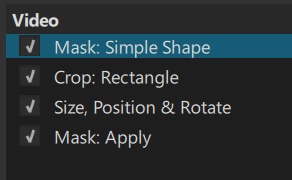
If you want to test the same filters, I made a filter set
Zoom-a-screen-area.zip (771 Bytes)
However, that doesn’t work anymore in v26.8.1. Increasing the zoom level in the SP&R filter doesn’t zoom the cropped area, it just kind of moves it on the screen:
Note:
If you copy the filters from version 25.10.31 and paste them in version 26.8.1, the zooming works fine.