while playing, the 48 kHz opus audio (fltp) is glitching everytime. any solutions out there for that?
What made your Opus file? It works fine for me, and you did not include ANY information that was requested in our bug template. You should convert it to WAV if it is not working for you.
It is also working for me. But maybe there is something unique about your file. Can you open the file, and then provide a screenshot of the Properties panel with the audio tab selected? Maybe someone will see a clue.
I really don’t know if copyrighted material can be sent here or not, but this is the audio. You can try to download it. I don’t fully know the characteristics of this specific audio, so I sent the entire audio.
@brian check this out
I found half of a fix, not fully: when audios are put on video tracks, they are treated as if they need to be proxied (probably same thread stuff and all). Glitches (unheard/delayed samples, nothing robotic) occur simply because the track is probably not suitable for audio-only-optimized stuff. (I personally think this distinction can be made stricter, where one won’t be allowed to put audios on video-only tracks, more like how Kdenlive does it. There is a thing about backwards compatibility, though…)
It’s still glitching as it did, even after decreasing the decibels (you can check the reference audio from the previous comment’s edit; I removed the file from the current revision). However, atleast the video is not slowing down anymore (and I didn’t realize fully before that even the video was laggy too), which makes it much much easier to edit stuff.
Moreover, I actually tried converting it to WAV through FFmpeg:
ffmpeg -i input.opus -c:a pcm_s16le -ar 48000 output.wav
This is the command I used (though the sample rate is already 48 kHz).
Sadly, even after decreasing the decibels of the WAV file, this audio also sounds a little bit “glitched” (unheard/delayed samples). But like we stated, because all the audios were on the audio track, the video wasn’t stopping like some sort of lag or buffering.
Additionally, I noted one thing (and this is actually more of a doubt): I used “Align to reference track” on Opus, the reference track being WAV, and it successfully found the offset; even negative offsets at 00:00 were gracefully handled. However, when I use “Align to reference track” on WAV, the reference track being Opus, it just doesn’t do the analysis properly. Any reasons behind why this might happen?
So, I have two things to resolve:
-
why is audio getting laggy/glitched when it’s starting?
-
why is the align to reference track thing happening?
I downloaded the opus file you provided and tested it with Shotcut version 26.09.27. It plays flawlessly. From your next post, I see that you have some other things going on in your project: proxies, multiple tracks, align to reference. So there might be something else going on.
First things first… Can you start a fresh project in Shotcut. Just do “file->close” and then only open your .opus file in the player. Don’t add it to the timeline or anything. Does it sound OK? If so, the problem is probably not your opus file. Based on your last post, it sounds like that might already be the case. But let’s just back up a step to be sure. Report back if you have clean audio when you only open the opus file with nothing else going on.
Regarding your other questions about Align to Reference, maybe you are experiencing an unrelated problem. One thing to be aware of is that Align to Reference does have an option to speed match the audio. If you selected that, maybe that is a factor.
I do not recreate this.
Can you report back what version of Shotcut you are using?
Shotcut version: 26.9.27
Just do “file->close” and then only open your .opus file in the player. Don’t add it to the timeline or anything. Does it sound OK?
Yep, even in this shotcut project, that technique is working totally fine. There is clean audio when started from 00:00:00.
One thing to be aware of is that Align to Reference does have an option to speed match the audio. If you selected that, maybe that is a factor.
Nope, that’s not the case. I used 0x speed matching, and even then, using “Align to reference track” on a wav file didn’t proeprly work.
For getting the glitched thing, go for something like this:
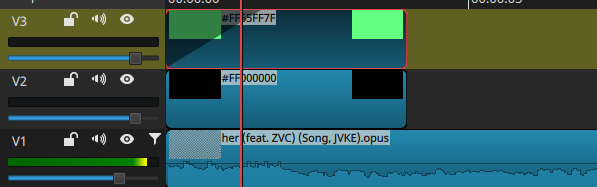
Don’t tick anything under the “Fade in video” filter.
Much easier to implement than the keyframed Opacity filter I did. Reproduced the bug properly; moving the audio track to A1 doesn’t change the glitching effect of the audio, as I said in the previous reply
We are getting somewhere. I think we have established that Opus has nothing to do with your problem as the subject suggests.
We still don’t know what “glitching” sounds like - only you do. Now I wonder if you are just experiencing the normal player playback lag. An easy way to test is to export your project and then use a player (windows media player or VLC) to play back the exported file. Does it sound good? If so, your are just experiencing lag from the preview player.
Have you tried toggling “Real Time”?
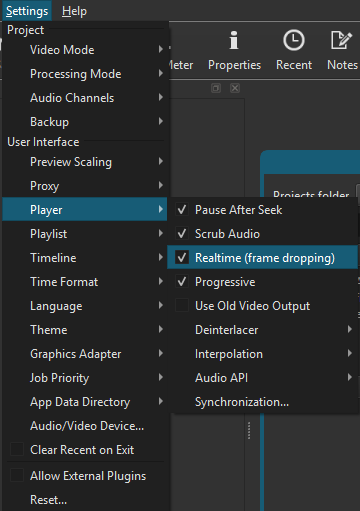
The playback is worse after turning off Realtime.
Thanks for sharing the screen recording. The “glitching” you are hearing is definitely playback lag. This happens when Shotcut can’t load the image/audio from the media and process it fast enough. I see you have proxy and preview scaling on. Those can help under the right circumstances. You can search this forum for a host of other ideas that can help with performance. We don’t know anything about your computer - maybe there is a hardware bottleneck. For example, Shotcut works best when the media is stored on fast storage. Unfortunately, we find that sometimes even people with high performance computers suffer playback lag.
Just to be absolutely certain, you could export your project as a test and see that the glitching is not apparent in the final output.
Version 26.9 introduced an audio playback regression on some systems or perhaps other conditions. Maybe you are affected. It was addressed in the new beta, should be in the FlatHub beta channel by now.
Yep, I see it… it is fully fine when exported
Might check it out after it gets released to stable channel