The Vignette filter darkens the edges of the image while preserving a brighter area toward the center.
Historically, vignetting originated as an optical artifact in photography and cinema, caused by lens design limitations, mechanical obstructions, or light falloff toward the edges of the image circle. Over time, it became a deliberate stylistic effect used to draw attention to the subject.
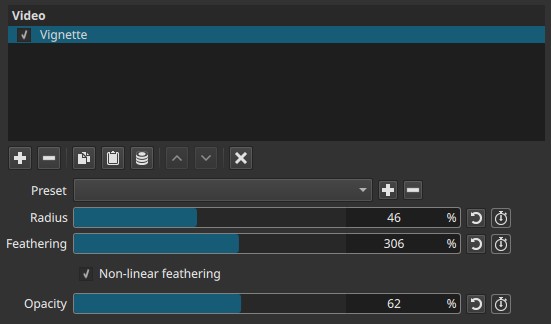
In Shotcut, the vignette is applied as a radial darkening mask centered on the image.
Parameters
Radius (0-100%)
Controls the size of the unaffected central area of the vignette.
-
0%
No clear center remains; the entire image is darkened
(At 100% Opacity, the frame becomes fully black) -
Higher values
Larger central area remains visible
Darkening is pushed further toward the edges
This parameter defines the radius of the vignette’s inner region.
Feathering (0-500%)
Controls the softness of the transition between the central area and the darkened edges.
-
0%
Hard, abrupt edge
The vignette boundary is clearly visible -
Higher values
Progressively softer and smoother transition
This controls the falloff of the vignette rather than its size.
Opacity (0-100%)
Controls the strength of the darkening applied by the vignette.
-
0%
No visible effect -
100%
Full vignette strength
Opacity affects how dark the edges become but does not change the vignette’s shape.
Keyframes
All three parameters (Radius, Feathering, and Opacity) can be keyframed, allowing the vignette to change over time.
This enables:
- Animated focus shifts
- Gradual darkening or brightening
- Stylized transitions or emphasis effects
Non-linear feathering
When enabled, the feathering follows a non-linear curve.
-
Disabled
Linear, even falloff from center to edges -
Enabled
More natural, film-like falloff
The transition accelerates or decelerates instead of changing evenly
This option produces a smoother, more organic vignette similar to optical lens behavior.
Visual characteristics
Typical effects include:
- Darkened corners and edges
- Focused attention toward the center
- Hard or soft vignette boundaries depending on Feathering
- Natural-looking falloff when Non-linear feathering is enabled
Recommended use cases
- Directing viewer attention to a subject
- Simulating lens or optical characteristics
- Creating mood or atmosphere
- Subtle framing or stylized transitions using keyframes
Limitations
- Radial shape only (no custom mask)
- Uniform application across the frame
- Does not affect color, only luminance
- Extreme settings may obscure important details