Hey there!
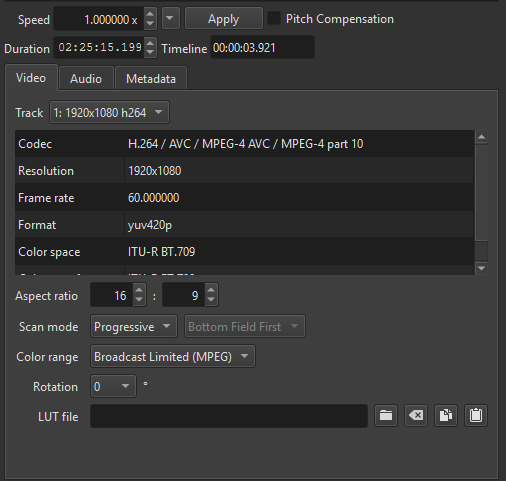
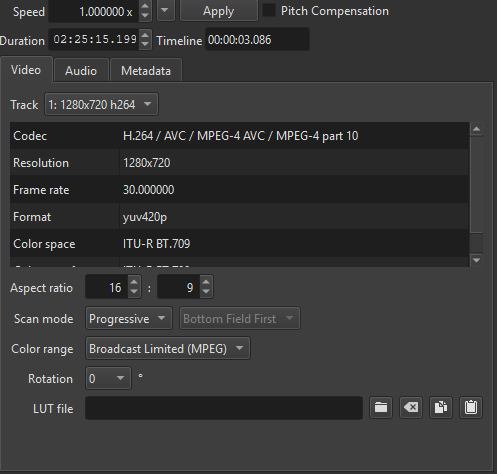
So I’m having an issue getting the video mode resolution change to affect my entire project, all the clips are pulling from the same one source video with one steady resolution, but for some reason, it only seems to be taking effect 16:13 into the project. The goal is for each clip to have the frame rate and resolution of the first image below, but every one prior to 16:13 has the second image below. Am I able to manually change the resolution in this screen myself? I wouldn’t mind going through each one if that is something I can change myself.
Any help is appreciated, thank you so much!
You are showing screenshots of Properties, which often shows information about the clips or file sources, not the project. Changing Video Mode is NOT supposed to change the things you see in clip Properties. There are several ways to see the current project resolution:
- in the title bar when not using automatic video mode, otherwise:
- click Output in the top left corner of Timeline to select it, and then see Properties, which shows the properties of the timeline
- Settings > Video Mode > Custom > Add… then Cancel
- Export > Advanced > Video
Properties shows what it is talking about at its top, which you inconveniently omitted from your screenshots.
Also, when you hover the mouse over the Properties heading for a media clip, it shows the full path:
If all of yours shows the same file, then there might be somehow stale metadata stored in the project file. Maybe the Reload button will help or in the Properties > menu > Reset. If not, then it is simply stale metadata and does not affect the rendering. Something weird happened, which is a bug. Next time, try to ensure you set Video Mode at the beginning of a project.
Gotcha, thanks for replying so fast!