Creates a temporal zoom feedback effect by reusing and scaling previous frames.
The result resembles a visual echo where the image appears to zoom in or out continuously, producing a disorienting or hypnotic motion.
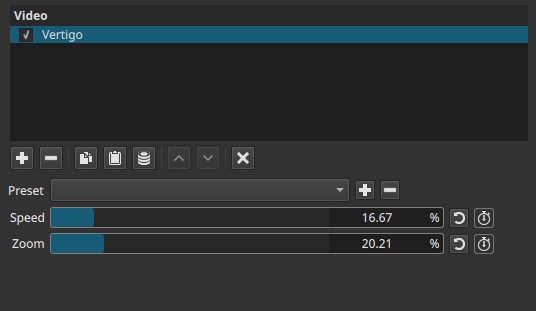
Vertigo is a temporal effect. Its appearance depends on motion over time; evaluating it on a single frame is misleading.
Parameters
Speed (0.00 - 100.00%)
Controls how quickly the feedback zoom evolves over time.
-
Low values
Slow, subtle zoom drift. The effect builds gradually and is less distracting. -
Mid values
Clearly visible motion. The zoom progression becomes noticeable and rhythmic. -
High values
Fast zoom progression. The image rapidly expands or collapses, producing strong visual instability.
Behavior notes:
- Speed affects temporal progression, not zoom amount.
- Higher values increase how quickly the effect changes from frame to frame.
- Visual intensity depends on both Speed and Zoom together.
Zoom (0.00 - 100.00%)
Controls the strength of the zoom applied to the feedback image.
-
Low values
Minimal scaling. The effect is subtle and may be hard to notice without motion. -
Mid values
Moderate scaling. The zoom feedback becomes clearly visible. -
High values
Strong scaling. The image rapidly grows or shrinks within itself, often revealing borders or heavy repetition.
Behavior notes:
- Zoom defines how much scaling is applied, not how fast.
- Extreme values can cause strong image repetition or cropping artifacts.
Keyframes
Both Speed and Zoom can be keyframed.
This enables:
- Gradual buildup or release of the vertigo effect
- Pulsing or oscillating zoom feedback
- Time-based transitions between stable and unstable visuals
Parameter interaction
- Zoom sets the magnitude of scaling applied to previous frames.
- Speed controls how quickly that scaling evolves over time.
- High Zoom with low Speed produces slow, dramatic distortion.
- High Speed with low Zoom produces fast but subtle motion.
- High values on both produce aggressive, disorienting results.
Visual characteristics
- Repeated zooming of the image into itself
- Infinity mirror–like effect caused by recursive frame feedback
- Motion trails caused by temporal feedback
- Progressive scaling artifacts
- Disorienting or hypnotic visual motion
Recommended use cases
- Stylized or experimental visuals
- Dream, hallucination, or disorientation effects
- Abstract motion backgrounds
- Emphasizing instability or psychological tension
- Transitional effects between scenes
Usage notes and tips
- Always evaluate the effect during playback, not on a still frame.
- Start with low Zoom values and increase gradually.
- Keyframing Speed often produces smoother results than abrupt changes.
- The effect is sensitive to frame rate and clip length.
Limitations
- Can become visually overwhelming at high values
- No control over direction (inward vs outward is implicit)
- Accumulates compression artifacts over time
- Not suitable for subtle correction tasks