Automatically applies fade-in and fade-out to all video clips within a single track.
The filter operates at the track level, not on individual clips, and is intended to automate consistent fades across multiple clips at once.
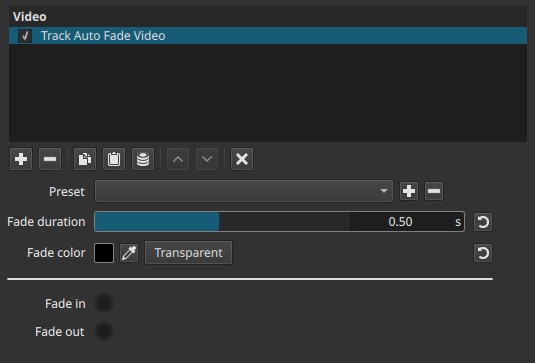
This filter is not keyframeable and applies the same fade behavior uniformly to every clip in the selected track.
Availability and scope
This filter is only visible and accessible when the video track header is selected, not when an individual clip is selected.
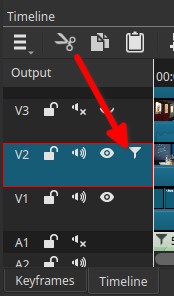
-
It does not appear when a clip is selected.
-
It applies to all clips contained in the selected track.
-
Fades are applied automatically at:
- the beginning of each clip (fade in)
- the end of each clip (fade out)
This makes it a track-wide automation tool rather than a clip-level effect.
Parameters
Fade duration (0.01–1.00 s)
Defines the length of the fade applied at the start and end of each clip, in seconds.
-
Low values (≈0.01–0.20 s)
Very fast fades. Transitions are barely noticeable. -
Mid values (≈0.30–0.70 s)
Smooth, conventional fades suitable for most editing workflows. -
High values (≈0.80–1.00 s)
Long, clearly visible fades.
Behavior notes:
- The same duration is used for both fade-in and fade-out.
- The duration is applied independently to each clip.
Fade color
Defines the color used for the fade.
Controls include:
- A color swatch to open the color palette
- A color picker to sample a color directly from the player preview
- A Transparency button to fade using alpha instead of a solid color
Behavior notes:
- Using a solid color produces a fade to/from that color.
- Using Transparency produces a fade to/from transparency, revealing underlying tracks.
- The chosen color applies uniformly to all clips in the track.
Fade direction indicators (non-editable)
Two radio buttons are displayed:
- Fade in (locked)
- Fade out (locked)
These are informational only and indicate that both fade-in and fade-out are applied automatically. They are not user controls.
Visual characteristics
- Consistent fade-in at the start of each clip
- Consistent fade-out at the end of each clip
- Uniform color or transparency behavior across the entire track
- No per-clip variation
Recommended use cases
- Applying consistent fades to many clips quickly
- Normalizing transitions in montage or compilation tracks
- Preparing tracks for insertion over background video
- Avoiding repetitive manual fade setup on each clip
Limitations
- Track-level only; cannot be applied to individual clips
- No per-clip customization
- No keyframe support
- Same duration and color for all clips
- Not suitable when clips require different fade timings